Managing Streaming Dataflow Job using Kubernetes Config Connector
Kubernetes config connector (KCC) is an open source addon that allows us to manage GCP resources through Kubernetes, thus preserving it as infrastructure as a code. Whenever changes are applied through the cluster, the Config Connector Custom Resource (CR) will create and manage a Kubernetes resource. Kubernetes config connector, supports various Google Cloud resources, such as Dataflow, PubSub, Bigquery, and so on.
Suppose we want to create a streaming Dataflow job from PubSub to Bigquery, it will require us to create a set of resources such as PubSub topic, Bigquery table, Storage's bucket to act as a temporary path for the job, and a Dataflow job as well.
Here's an available sample from Google Cloud on how to create a streaming job using KCC.
- Define a PubSub Topic
apiVersion: pubsub.cnrm.cloud.google.com/v1beta1
kind: PubSubTopic
metadata:
  name: dataflowjob-dep-streaming
- Define Bigquery Dataset and Table
apiVersion: bigquery.cnrm.cloud.google.com/v1beta1
kind: BigQueryDataset
metadata:
  name: dataflowjobdepstreaming
---
apiVersion: bigquery.cnrm.cloud.google.com/v1beta1
kind: BigQueryTable
metadata:
  name: dataflowjobdepstreaming
spec:
  datasetRef:
    name: dataflowjobdepstreaming
- Create a Storage Bucket
Since in this example we want to make sure the bucket is destroyed when we delete the resources we set the annotation of force-destroyas true.
apiVersion: storage.cnrm.cloud.google.com/v1beta1
kind: StorageBucket
metadata:
  annotations:
    cnrm.cloud.google.com/force-destroy: "true"
  name: ${PROJECT_ID?}-dataflowjob-dep-streaming
- Create a Dataflow Job specification
The following sample will create a Dataflow Job with an available public template from Google. We use all of the resources that we already defined in this Job specification. As this is a sa mple, we set the on-delete annotation as cancel. However for production usage where we want to make sure all the data are processed first there is another value called drain . All specs can be seen in this YAML specification. Generally speaking if we already create a template we can push it into Storage Bucket and create a YAML specification pointing the template to our template.
apiVersion: dataflow.cnrm.cloud.google.com/v1beta1
kind: DataflowJob
metadata:
  annotations:
    cnrm.cloud.google.com/on-delete: "cancel"
  labels:
    label-one: "value-one"
  name: dataflowjob-sample-streaming
spec:
  tempGcsLocation: gs://${PROJECT_ID?}-dataflowjob-dep-streaming/tmp
  templateGcsPath: gs://dataflow-   templates/2020-02-03-01_RC00/PubSub_to_BigQuery
  parameters:
    inputTopic: projects/${PROJECT_ID?}/topics/dataflowjob-dep-streaming
    outputTableSpec: ${PROJECT_ID?}:dataflowjobdepstreaming.dataflowjobdepstreaming
  zone: us-central1-a
  machineType: "n1-standard-1"
  maxWorkers: 3
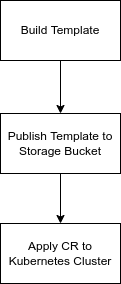
Suppose we want to create a new Streaming Job, then we can define the following steps to create said job.
Managing Streaming Dataflow Job using Kubernetes Config Connector was originally published in Google Cloud - Community on Medium, where people are continuing the conversation by highlighting and responding to this story.
Comments
Post a Comment