Let your developer manage Identity on AWS— Delegate responsibility using permissions boundaries

Cloud Agility and Safety
To improve their Cloud agility, companies must permit developers to experiment and innovate quickly and safely. For example, what happens if our developers needed the IAM privileges to permit a Lambda function to read/write data on a DynamoDB or S3 bucket ? The right approach is to delegate to our developers the responsibility for app-specific IAM resources without compromising security requirements.
The centralized vs decentralized model
Let's assume that our developers are using various services like AWS Lambd a, Amazon EC2 and Amazon EKS. All of these services need IAM roles to perform some actions inside AWS. Who is going to create those roles ? Most of the company resolve this problem by adopting a centralized governance (cloud resource broker) model. This approach guarantees maximum controls but reduces agility: the developers must ask the MSO (Managed Service Organization) for the app-specific identity resources, wait for resources, test the resources and eventually adapt the request. This approach slows down the process, we need to introduce a different approach, more agile and therefore less centralized. In a decentralized governance model, we can delegate some responsibility, such as identity management, directly to our developers but inside a well-defined perimeter with the right controls. In this model, the MSO is responsible in create and maintain the controls (directive, preventive, detective and reactive) in order to guarantee the organizati on's security and compliance requirements.

In a decentralized governance model, it's essential to develop a critical mass of people with AWS experience, establish new operational processes, and leverage services designed to improve agility and guarantee safety [1]. Decentralized model can help you to strike the right balance between agility and safety in a Cloud world. So this is where a permissions boundary comes in!
Permissions boundaries for IAM entities
AWS Identity and Access Management (IAM) service provide permissions boundaries features to control the maximum permission that IAM entities (users or roles) can have. As the Service control policies (SCPs) the permission boundary restricts the permissions of the users and roles a ttached to it but unlike the SCP a permission boundary does not actually grant permissions. You can use permission boundaries on two different scenarious:
- Limit maximum permission of a user or role
- Delegate identity management to others
In both cases the permission boundary is an AWS managed policy or a customer managed policy that set the boundary for an IAM entity (user or role).
Scenario 1 — Limit permission of a specific IAM entity
In this scenario we put a permission boundary directly to an IAM entity (user or role) to limit the maximum permission that this identity can receive.
aws iam put-user-permissions-boundary --permissions-boundary arn:aws:iam::123456789012:policy/boundary --user-name user
In this configuration we are creating a preventive control where the user or role can perform only the actions that are allowed by both its identity-based policies and its permissions boundaries.
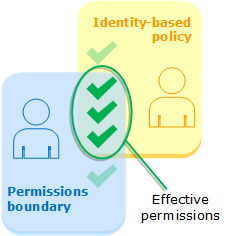
Identity-based policies (inline or managed )are attached to a user or role. Identity-based policies grant permission to the entity while permissions boundaries limit those permissions. The effective permissions are the intersection of both policy types. An explicit deny in either of these policies overrides the allow.
Scenario 2 — Delegate identity management to others
In this scenario we use permissions boundaries to delegate permissions management tasks, such as role creation, to IAM users in your account. This permits others to perform tasks on your behalf within a specific boundary of permissions. For example, assume that Account Admin is the administrator of AWS account and he wants to delegat e Lambda role creation to the DevOps team. However, he must ensure that DevOps team creates role that permit only to get objects from an S3 bucket.

To enforce these rules we must completes the following tasks:
- The Account Admin create the Lambda Permission Boundary that permit only the S3:GetObjectaction
- The Account Admin attach to DevOps Team the DevOps User Identity Based policy that permit the IAM:CreateRoleaction and require the Lambda Permission Boundary attachment
- The DevOps Team can create the role Lambda Role with the Lambda Role Identity Based Policy and Lambda Permission Boundary attached to role.
Reference
[1] Governance in the AWS Cloud: The Right Balance Between Agility and Safety
Let your developer manage Identity on AWS— Delegate responsibility using permissions boundaries was originally published in Towards AWS on Medium, where people are continuing the conversation by highlighting and responding to this story.
Comments
Post a Comment