Kubernetes Services ☸☸ : Part-2
Kubernetes Services ☸☸ : Part-2
What are Services in Kubernetes ?
Introduction 🚩🚩
Hi fellow Readers 👋 :))
As I told you all in my previous article, that the subject "Kubernetes Services" is a big and lengthy one. So I decided to write two parts for it. This will not only help me to make the articles short and crisp but also I feel help you peeps to understand the concept better and in greater depth.
This will be the second and final part of this series. In this part, we will try to understand the following things :
- What is a ClusterIP Service ?
- How does a ClusterIP service work ?
- How to make a ClusterIP Service using a yaml file ?
- What is a LoadBalancer Service ?
- How to make a LoadBalancer Service using a yaml file ?
Recap 🔦🔦

Let us quickly recall of all the things that we have already discussed in the previous part of this series.
Services in Kubernetes is an abstract way to expose an application running on a set of Pods as a network service.
There are four types of services in Kubernetes :
- NodePort
- ClusterIP
- LoadBalancer
- ExternalName
I have already discussed all the following things in my previous post.
- What is a Kubernetes Service ?
- Types of Services in Kubernetes.
- How does a NodePort Service work ?
- How to create a NodePort Service using yaml ?
You all can refer it here
Kubernetes Services ☸☸ ️️: Part-1
Ok enough of all t alks.
So without any further delay, let us get started with our article :))
What is a ClusterIP Service ?? 🤔🤔
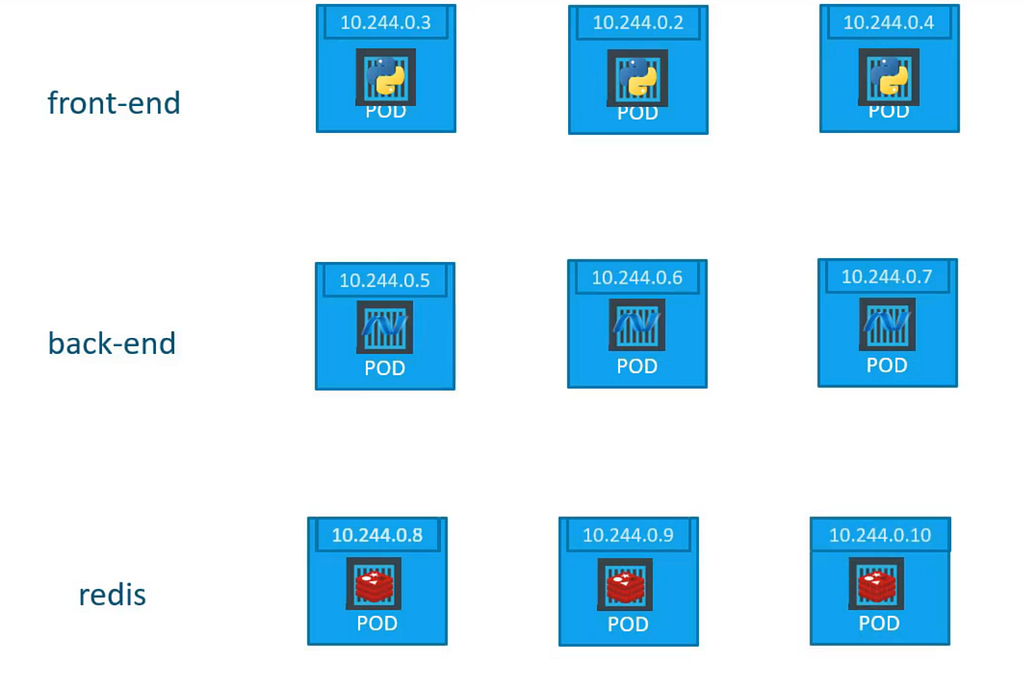
Let us try to understand the scenario shown in the above diagram.
In a Kubernetes Cluster there are three group of PODs present as following :
- Frontend PODs [Pods which are running the frontend part of the web application on them]
- Backend PODs [Pods which are running the backend part of the web application on them]
- Database PODs [Pods which are running the database application instances on them]
All the above PODs are running properly and the applications running on them are also i n good state and shape. But for the proper working of the end user application, it is important that all the pods should properly work together just not independently.
So now the question arises that how can we connect the frontend pods to backend pods and backend pods to database pods ?? 🤔🤔
One naive solution can be manually configuring the properties of pods using IP address so that they can communicate with each other.
But the above approach will give the administrator unimaginable nightmares 👻.
Just imagine configuring 1000 of PODs some of them going down, coming back up. All with different and new ips. The cycle of DOOM it seems 😰
Here comes the services of type ClusterIP.
They make all this work easy and possible. Let us see how 🐵
How does a ClusterIP Service work ?? 🤔🤔
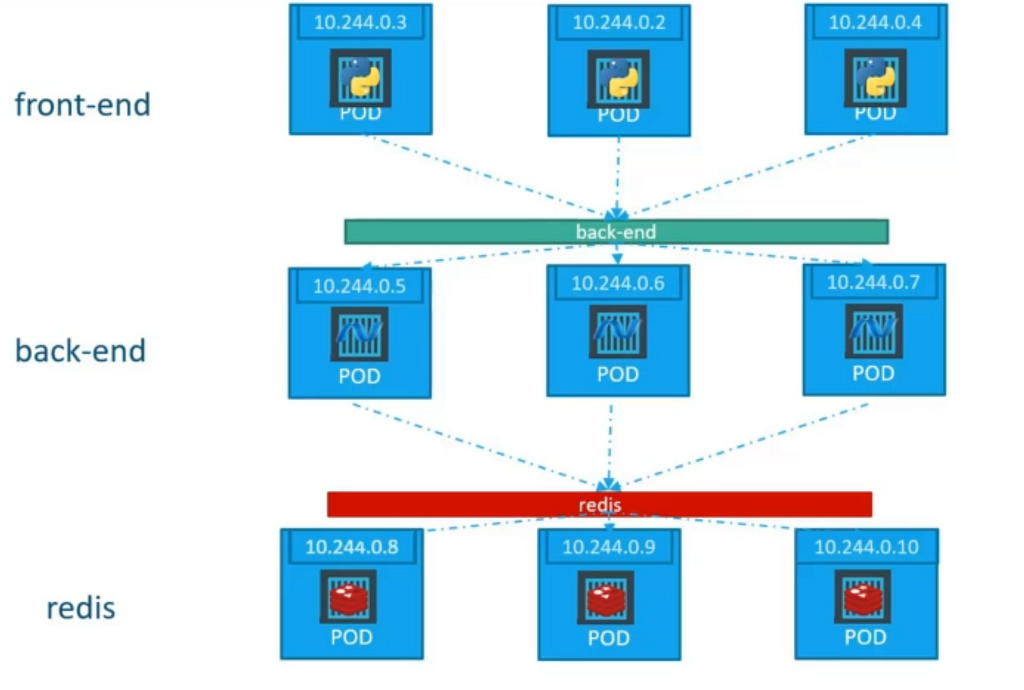
Let us try to understand the scenario shown in the above diagram :
- There are three sets of PODs [frontend, backend & database]
- We created two ClusterIP services (back-end & redis) to ease out the process of inter pod communication.
Let us dig how the ClusterIP services will work behind the scene :
- Imagine a Frontend POD requires to fetch some backend services.
- The frontend POD will contact the back-end service we created.
- The back-end service will map the POD communication request on the suitable backend POD.
- The backend POD will return the needed data, which will be given to frontend POD through the service.
All the things like, which POD should the request be passed or how the data should be given back to the requestor POD, will be taken care by the service itself without administrator intervention.
Even above this, the layers of POD can be anytime scaled up or scaled down depending on the load on the cluster and it won't break the communication system which is being designed by these services.
Because the services can also scale all along the cluster even if there are 1000 nodes present without any hassle.
In this simple way, By using the ClusterIP services. PODs are able to communicate with other PODs present in the cluster so easily :))
How can we create a ClusterIP service ?? 🤯🤯
We can create a ClusterIP service using YAML files. To create a Kubernetes ClusterIP service with YAML, you first create an empty file, assign it the necessary access permissions, and then define the necessary key-value pairs.
Below is an example of a ClusterIP service definition file (
apiVersion: v1
kind: Service
metadata:
  name: back-end
spec:
  type: ClusterIP
  selector:
      name: myapp
      type: back-end
  ports:
    - targetPort: 80
      port: 80
There are many aspects and components in this file. Lets break down each one of them 😀
- Let's start with the apiVersion (key-value pair). This is used to clarify what API server and version you will be running in the background when creating the ClusterIP service.
- Next is kind which signifies the kind of definition file this is. In our case, it is a "Service".
- Next is metadata, which is a dictionary including the item name. The metadata stores values that are assigned to the Cl usterIP Service which is being created.
- Finally there is spec which is actually an array/list. Following are the values which are present in it and what they mean.
type : The value of this key, defines what is the type of service is being created. In our case, it is a "ClusterIP".
selector : It basically has the labels of the PODs thus helping the service to identify the PODs it has to work with.
ports : It is the section which contains the ports the service has to work with.
port has the value of the port present on the service object where the call request will be mapped.
targetPort has the value of the port present on the POD where the endpoint of the application is exposed and where the POD request will be finally mapped to in the end.
We are done with the ClusterIP service definition file. Now we can save and exit the file.
Use this command to create the ClusterIP service based on the above YAML file :
kubectl create - f cluster_ip.yaml
Use this command to view all the services running on the cluster :
kubectl get services
What is a LoadBalancer Service ?? 🤔🤔
Imagine a scenario where following has been done :
- You have used NodePort service to expose the application running on POD to the Worker node's port.
- Now let us assume there are 100 pods running the same application across different worker nodes.
- Each worker node has different ip address. So the URL to access on each node will differ even if the port is same.
So when giving the user endpoint, which node's URL will you give and h ow many URLs will you give 😓. Ultimately this will result into a mess.
Now to solve the above problem, we create a LoadBalancer service.
Which in simple terms, exposes the whole application by giving user just one URL. And above this, it uses some cloud provider's (gcp, azure, aws etc) load balancer to balance the user requests to the PODs who are running these services.
In this simple way, By using the LoadBalancer services. User requests can be easily load balanced and the whole application can be exposed using a single URL to the end user :))
How can we create a LoadBalancer service ?? 🤯🤯
We can create a LoadBalancer service using YAML files. To create a Kubernetes LoadBalancer service with YAML, you first create an empty file, assign it the necessary access permissions, and then define the necessary key-value pairs.
Below is an example of a LoadBalancer service definition file (load_balancer.yaml)
apiVersion: v1
kind: Service
metadata:
  name: myapp-service
spec:
  type: LoadBalancer
  selector:
    app: front-end
  ports:
    - port: 80
      targetPort: 80
      nodePort: 30008
There are many aspects and components in this file. Lets break down each one of them 😀
- Let's start with the apiVersion (key-value pair). This is used to clarify what API server and version you will be running in the background when creating the LoadBalancer service.
- Next is kind which signifies the kind of definition file this is. In our case, it is a "Service".
- Next is metadata, which is a dictionary includin g the item name. The metadata stores values that are assigned to the LoadBalancer Service which is being created.
- Finally there is spec which is actually an array/list. Following are the values which are present in it and what they mean.
type : The value of this key, defines what is the type of service is being created. In our case, it is a "LoadBalancer".
selector : It basically has the labels of the PODs thus helping the service to identify the PODs it has to work with.
ports : It is the section which contains the ports the service has to work with.
nodePort has the value of the port present on the Node where the user request will come.
port has the value of the port present on the service object where the user request will be mapped.
targetPort has the value of the port present on the POD where the endpoint of the application is exposed and where the user request will be finally mapped to in the end.
We are done with the LoadBalancer service definition file. Now we can save and exit the file.
Use this command to create the LoadBalancer service based on the above YAML file :
kubectl create -f load_balancer.yaml
Use this command to view all the services running on the cluster :
kubectl get services
What next ? 👀 👀

Thanks a lot for reaching till here! It is the end of this article.
But we have only scratched the surface of the K8s ecosystem :))
Much more to go, it will be a fun journey where we will learn a lot of cool stuff together.
Do clap and follow me 🙈 if you like my writings and want to read more from me in the future :))
In case of any doubts around this article or for some general chit chat, feel free to reach out to me on my social media handles
Twitter — https://twitter.com/ChindaVibhor
LinkedIn — https://www.linkedin.com/in/vibhor-chinda-465927169/
Previous articles written by Me :
- Kubernetes Services ☸☸ ️️: Part-1
- What are Namespaces in Kubernetes ??
- Kubernetes Object : Deployments ☸☸
References :
I will still keep on coming with new articles covering a bunch of topics I am exploring.
That's All folks !! Doodles :))
Kubernetes Services ☸☸ : Part-2 was originally published in Google Cloud - Community on Medium, where people are continuing the conversation by highlighting and responding to this story.
Comments
Post a Comment