Kubernetes Services ☸☸ ï¸ï¸: Part-1
What are Services in Kubernetes ?
Introduction 🚩🚩
Hi fellow Readers 👋 :))
The Subject "Kubernetes Services" is a big and lengthy one. So I have decided to write two parts for it. This will not only help me to make the articles short and crisp but also I feel help you peeps to understand the concept better and in greater depth.
In this part, we will try to understand the following things :
- What is a Kubernetes Service ?
- Types of Services in Kubernetes .
- How does a NodePort Service work ?
- How to make a NodePort Service using a Yaml file ?
So without any further delay, let us get started with our article :))
Definition 🤓🤓

Services in Kubernetes is an abst ract way to expose an application running on a set of Pods as a network service.
With Kubernetes you don't need to modify your application to use an unfamiliar service discovery mechanism. Kubernetes gives Pods their own IP addresses and a single DNS name for a set of Pods, and can load-balance across them.
Ok Ok enough of technical definition. 😏
Let us understand "What are Services ??" using very simple terms. Lets GO !!🏇
Lets Dig In !!⛏️⛏️
Imagine there are three different group of PODs present on a Kubernetes node.
- Frontend PODs [Pods which are running the frontend part of the web application on them which will be used by the end user]
- Backend PODs [Pods which are running the backend part of the web application on them which will be used by the end user]
- Database PODs [Pods which run the database application insta nces, which are responsible for storing the data of the web applications]
All the above nodes are running properly and the applications running on them are also in good state and shape.
But there are some questions which might arise 👀👀. Let us discuss them :
- How does the end user access the frontend application running on frontend PODs in their respective computer ??
- How does the frontend PODs communicate with the backend PODs to make the whole application actually run ??
- How does the frontend PODs communicate with the database PODs to get the data required for them ??
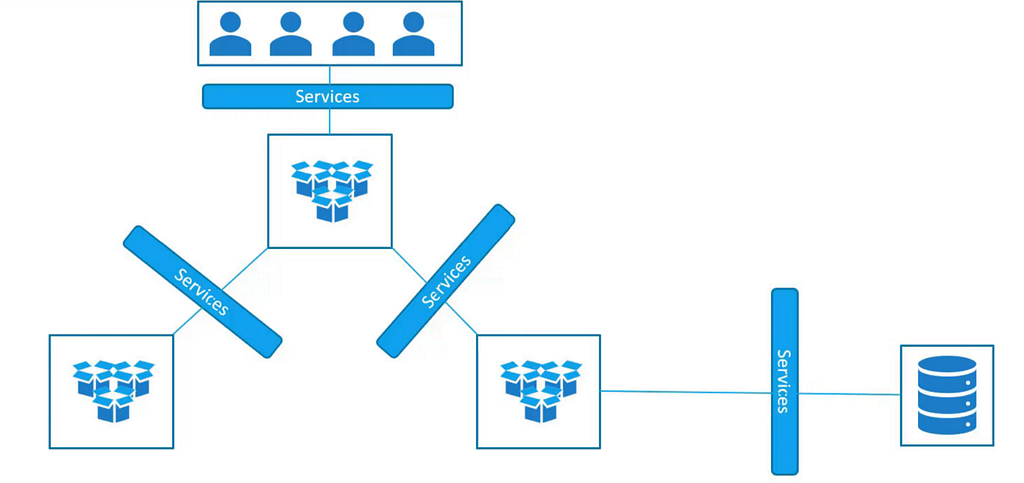
As the above diagram depicts, all the above questions / problems which we discussed. Can be easily solved by using "Kubernetes Service s".
Kubernetes Services in very simple terms, are Kubernetes objects which help us to
- Expose the applications running on the PODs to the end user.
- Help the PODs to communicate with other PODs that are present on the Kubernetes cluster i.e helps in inter-pod connectivity.
- Helps to collect the user requests and equally divide those requests among the applications running on the PODs i.e helps to load balance the user requests for the applications running on the PODs.
Hurray !!🥳🥳 Now we understand what are Services and what they can do.
Lets now discuss about the types of Services :))
Types of Kubernetes Services 🌐🌐

How does a NodePort Service work ?? 🤔🤔
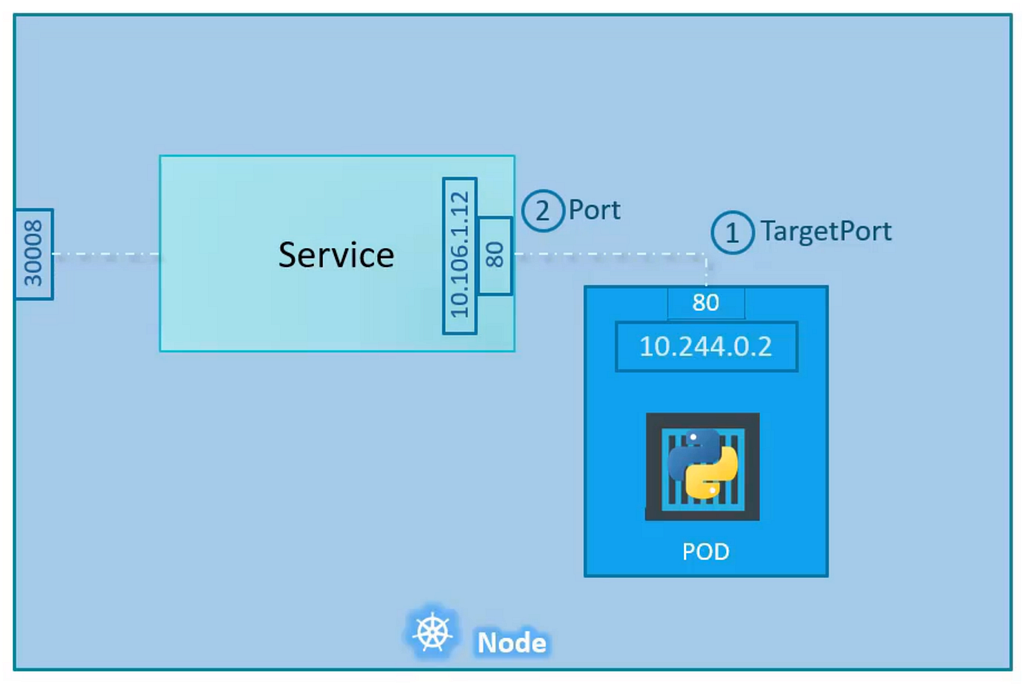
Let us try to understand the scenario shown in the above diagram.
- There is a worker node which contains a POD in it.
- The POD runs a web application on it.
- There is a NodePort service which we have created and that service, maps the port on the node to a port present on the node.
Now whenever an end user wants to access the web application running on the POD, following things happen behind the scenes :
- The user just send request on the Node port number which is mapped to the POD (Here port : 30008)
- N ext the NodePort service takes that user request and maps it to its own port i.e service port (Here port : 80)
- Next from the service port, the request is being mapped to the port of the web application POD (Here TargetPort : 80)
In these simple steps, By using the NodePort service. Users are able to access the applications which are running on the PODs from their own devices.
How can we create a NodePort service ?? 🤯🤯
We can create a NodePort service using YAML files. To create a Kubernetes NodePort service with YAML, you first create an empty file, assign it the necessary access permissions, and then define the necessary key-value pairs.
Below is an example of a NodePort service definition file (nodePortService.yaml)
apiVersion: v1
kind: Service
metadata:
 name: my-service
spec:
 type: NodePort
 selector:
  app   : echo-hostname
 ports:
  - nodePort: 30008
    port: 80
    targetPort: 80
There are many aspects and components in this file. Lets break down each one of them 😀
- Let's start with the apiVersion (key-value pair). This is used to clarify what API server and version you will be running in the background when creating the NodePort service.
- Next is kind which signifies the kind of definition file this is. In our case, it is a "Service".
- Next is metadata, which is a dictionary including the item name. The metadata stores values that are assigned to the NodePort Service which is being created.
- Finally there is spec which is actually an array/list. Following are the values which are present in it and what they mean.
type : The value of this key, defines what is the type of service is being created. In our case, it is a "NodePort".
selector : It basically has the labels of the PODs thus helping the service to identify the PODs it has to work with.
ports : It is the section which contains the ports the service has to work with.
nodePort has the value of the port present on the Node where the user request will come. It's value can be in the following range 30000–32767.
port has the value of the port present on the service object where the user request will be mapped.
targetPort has the value of the port present on the POD where the endpoint of the application is exposed and where the user request will be finally mapped to in the end.
We are done with the NodePort service definition file. Now we can save and exit the file.
Use this command to create the NodePort service based on the above YAML file :
kubectl create -f nodePortService.yaml
Use this command to view all the services running on the cluster :
kubectl get services
What next ? 👀 👀

Thanks a lot for reaching till here! It is the end of this article.
I will soon come back with the next part of this blog. Where I will try to explain other types of services in depth.
Much more to go, it will be a fun journey where we will learn a lot of cool stuff together.
Do clap and follow me 🙈 if you like my writings and want to read more from me in the future :))
In case of any doubts around this article or for some general chit chat, feel free to reach out to me on my social media handles
Twitter — https://twitter.com/ChindaVibhor
LinkedIn — https://www.linkedin.com/in/vibhor-chinda-465927169/
Previous articles written by Me :
References
I will still keep on coming with new articles covering a bunch of topics I am exploring.
That's All folks !! Doodles :))
Kubernetes Services ☸☸ ️️: Part-1 was originally published in Google Cloud - Community on Medium, where people are continuing the conversation by highlighting and responding to this story.
Comments
Post a Comment