Host Apache Web Server on Amazon EC2

Apache webserver can be used to host your website which we can do with help of some services which are provided by Amazon web services (AWS).

Pre-requisites :
  1. Need AWS account with internet connection
  2. Basic knowledge of Cloud Computing or Cloud services.
  3. Have AWS account or can sign in using Free Tier of AWS.

Let's Start With AWS Console :

First Create VPC :

For singl e public subnet

  1. Check Health Report before implementing VPC
  2. Login to AWS account > click on services >VPC
  3. Click on Create VPC > VPC and more > No. of AZ (Select 1 ) with one public subnet > Create
  4. Then, Modify " Auto-assign IP settings "
  5. Go to Security Groups and copy security ID for default security group
  6. Click on Create new security group with add All traffic in first rule and paste security ID
  7. Now, select SSH port to My IP in other rule and add HTTP rule to my IP as we have view Apache web page using browser.
Screenshot from Amazon Console
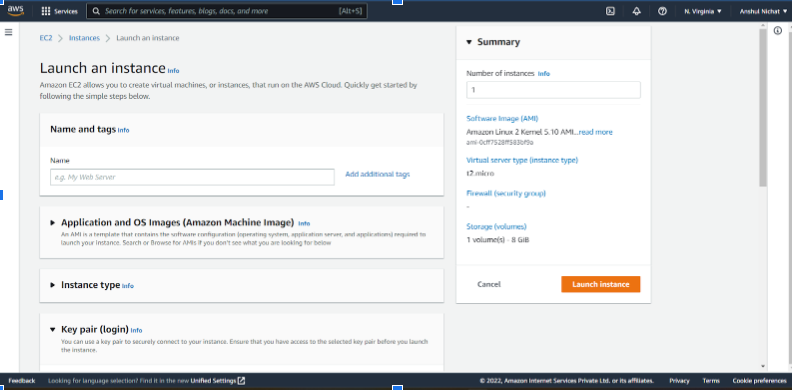
Create EC2 instance in Public subnet :
  1. Step 1 : Choose AMI (Amazon machine image) Linux or windows (processor &Ram)
  2. Steps 2 choose instance type ( Hardware capa city) — (e.g t2.micro )
  3. Step 3 :Configure instance details (Auto-assign public IP enable)
  4. Step 4 : Add storage 8GB (space where you'll have data)
  5. Step 5 : Add Tags
  6. Steps 6 : Configure security Groups
  7. Review and Launch.
Screenshot from Amazon Console

Now, Use SSH extension to login through SSH shell.
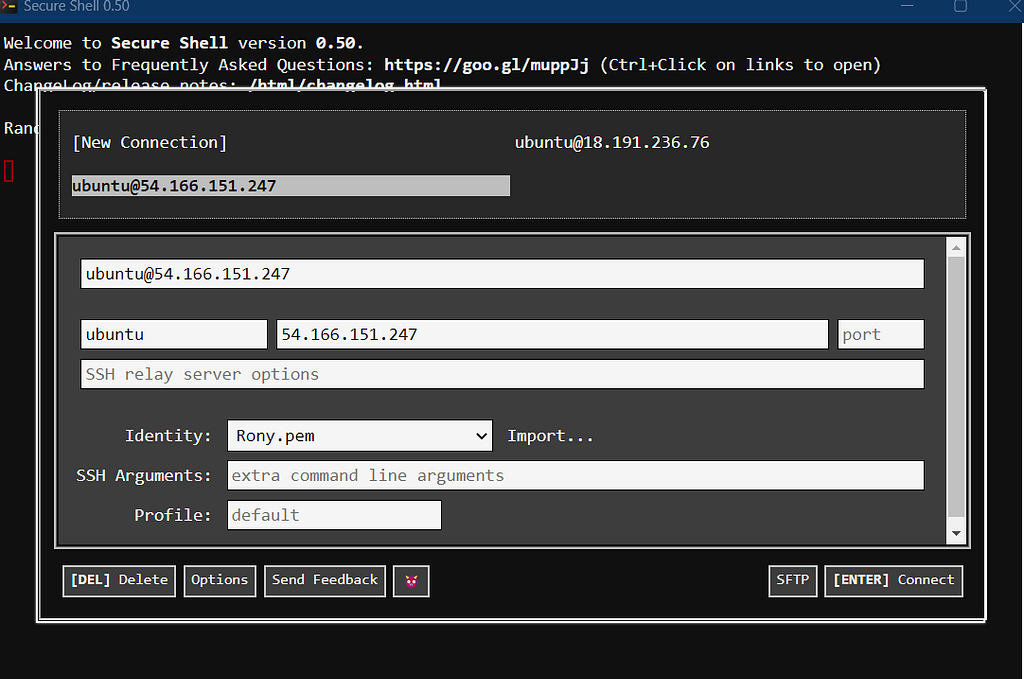
Screenshot from SSH Extension
Install Apache :
  1. sudo apt update
  2. sudo apt install apache2
  3. cd /var/www/html/
  4. sudo nano /var/www/html/index.html (To Edit Html file)
  5. Copy public IP address from ec2 instance and paste it using google chrome or a ny other browser and you'll see Apache web page.
Screenshot from Chrome Browser

Congratulations, you've successfully hosted Apache webserver on Amazon EC2.

Afterwork :
  1. Terminate EC2 instance.
  2. Delete VPC which was created.
  3. Release Elastic IP address ( if you have deployed public + private cloud ) or else you'll get extra charges (As Amazon cloud delivers services on pay as you go pricing).

P.S : This is the easiest way to implement that worked for me.


Host Apache Web Server on Amazon EC2 was originally publish ed in Towards AWS on Medium, where people are continuing the conversation by highlighting and responding to this story.

Namaste Devops is a one stop solution view, read and learn Devops Articles selected from worlds Top Devops content publishers inclusing AWS, Azure and others. All the credit/appreciations/issues apart from the Clean UI and faster loading time goes to original author.

Comments

Did you find the article or blog useful? Please share this among your dev friends or network.

An android app or website on your mind?

We build blazing fast Rest APIs and web-apps and love to discuss and develop on great product ideas over a Google meet call. Let's connect for a free consultation or project development.

Contact Us

Trending DevOps Articles

Working with System.Random and threads safely in .NET Core and .NET Framework

Popular DevOps Categories

Docker aws cdk application load balancer AWS CDK Application security AWS CDK application Application Load Balancers with DevOps Guru Auto scale group Automation Autoscale EC2 Autoscale VPC Autoscaling AWS Azure DevOps Big Data BigQuery CAMS DevOps Containers Data Observability Frequently Asked Devops Questions in Interviews GCP Large Table Export GCP Serverless Dataproc DB Export GTmetrix Page Speed 100% Google Page Speed 100% Healthy CI/CD Pipelines How to use AWS Developer Tools IDL web services Infrastructure as code Istio App Deploy Istio Gateways Istio Installation Istio Official Docs Istio Service Istio Traffic Management Java Database Export with GCP Jenkin K8 Kubernetes Large DB Export GCP Linux MSSQL March announcement MySQL Networking Popular DevOps Tools PostgreSQL Puppet Python Database Export with GCP Python GCP Large Table Export Python GCP Serverless Dataproc DB Export Python Postgres DB Export to BigQuery Sprint Top 100 Devops Questions TypeScript Client Generator anti-patterns of DevOps application performance monitoring (APM) aws amplify deploy blazor webassembly aws cdk application load balancer security group aws cdk construct example aws cdk l2 constructs aws cdk web application firewall aws codeguru reviewer cli command aws devops guru performance management aws service catalog best practices aws service catalog ci/cd aws service catalog examples azure Devops use cases azure devops whitepaper codeguru aws cli deploy asp.net core blazor webassembly devops guru for rds devops guru rds performance devops project explanation devops project ideas devops real time examples devops real time scenarios devops whitepaper aws docker-compose.yml health aware ci/cd pipeline example host and deploy asp.net core blazor webassembly on AWS scalable and secure CI/CD pipelines security vulnerabilities ci cd pipeline security vulnerabilities ci cd pipeline aws smithy code generation smithy server generator
Show more