GCS Lifecycle Policies with Prefix & Suffix
In this Blog, we will be focusing on Google Cloud Storage (GCS) new features to manage the data stored in Buckets. Recently GCP launched the feature to manage the lifecycle of data stored in a bucket using the Object name matches prefix & Object name matches suffix, which makes it possible for users to create policies according to each folder or object name in a bucket. This feature was missing previously and lifecycle policies were based on the entire bucket, not on each folder or object, So let's explore this more in this blog.

Most Enterprise company is migrating their infrastructure & data to the cloud for better scalability and storage management. But managing data in an Enterprise company is a difficult task and the cost of data stored in the cloud is high soon all the cloud regions feel the pressure of the increased size of data. Here are some statistics on cloud usage.
- 100 billion TB of data will be there in the cloud by 2025
- 50% of the world's corporate data is stored in the cloud
- Cloud data centres account for 3% of the world's energy consumption
- 90% of large enterprises have adopted a multi-cloud infrastructure
- Enterprise accounts use an average of 2.6 public and 2.7 private clouds
What is Google Cloud Storage (GCS)?
Let's get some idea about Google Cloud Storage (GCS) and its storage features.
GCS is a service for storing your objects based data in Google Cloud. An object is an immutable piece of data consisting of a file of any format. You store objects in containers called buckets. We can create buckets in Google Cloud Projects and manage the access and policy on the buckets from Project, Folder & Organisation.
Features of GCS :
- Turbo Replication
- Object Lifecycle Management, Versioning, Retention policies
- Google managed, Customer-managed or supplied encryption keys
- Uniform & Fine grained bucket-level access
- Requester Pays Bucket Lock
- Pub/Sub notifications for Cloud Storage
- Cloud Audit Logs with Cloud Storage
GCS object storage classes :

- Standard storage: Standard storage is best for data that is frequently accessed ("hot" data) and/or stored for only brief periods.
- Nearline storage: Nearline storage is a low-cost, highly durable storage service for storing infrequently accessed data once in 3o days
- Coldline storage: Coldline storage is a very low-cost, highly durable storage service for storing infrequently accessed data a few times in 90 days
- Archive storage: Archive storage is the lowest-cost, highly durable storage service for data archiving, online backup, and disaster recovery.
Object Lifecycle Management.
Lifecycle Management is used to control how long an object needs to be stored in the bucket or in a certain storage class of bucket to save cost. In GCP to create lifecycle policy, we have to create lifecycle management configurations, each configuration contains a rule. Let's see h ow to create a rule
Step 1 :
- Navigate to GCP Console → Cloud Storage → Your Bucket, There are two main sections in configurations Select action & Object condition.

Step 2:
- In selecting an action phase we can select to change object class to Nearline, Coldline or Archive. Another way we can Delete objects or multipart uploads.

Step 3 :
- In the Objects conditions we can select on which condition the lifecycle policy will get triggered. So here are the latest changes in rule scopes
We can now select an object by its prefix & suffix
1) Using Prefix: In this option, we can add multiple prefixes in the object scope rules so objects that start with this pr efix will only get affected by the lifecycle policy. Using these scope rules we can set the policy on specific folders or objects.
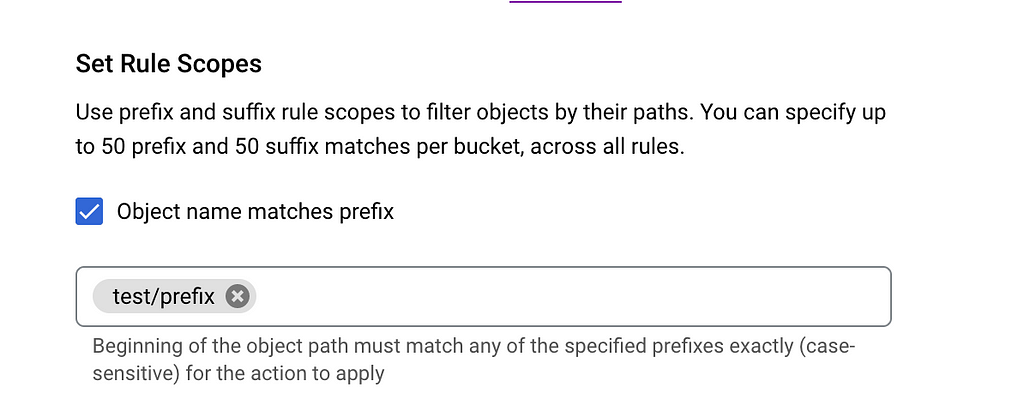
2) Using Suffix: In this option, we add multiple suffixes of the objects under the policy. So using this scope we can create a policy for certain object types such as '.png', '.jpeg', and '.mp4'. So we can have different lifecycle policies for each object type.

Step 4 :
- Now that our scope for an object is set let us explore the conditions for objects. there 9 conditionals options available, we can select a minimum of one or a maximum of 9 conditions for each lifecycle policy configuration.
- Age :
Counted from the object's creation date (when the object was added to the current bucket) - Created before :
Based on the object's creation date (when the object was added to the current bucket) - Storage class matches :
Based on storage classes available in condition rules are these Standard, Nearline, Coldline, Archive, Regional, Durable Reduced Availability - Number of newer versions :
Limits the number of versions stored, if object versioning has been enabled. - Days since becoming noncurrent :
Counted from when a live object was modified or deleted, if object versioning was enabled. - Became noncurrent before :
Based on when a live object was modified or deleted, if object versioning was enabled. - Live state : Applies action only to versioned objects with selected state Live or noncurrent
- Days since custom time :
Counted from the object's custom time, for objects that have this custom metadata. - Custom time before :
Based on the object's custom time, for objects that have this custom metadata.
These four steps are important for creating the lifecycle policy in GCS.
Make note that each lifecycle policy configuration is restricted to a single GCS bucket. So if you have more than one bucket then a lifecycle policy configuration has to be created in each bucket.

Cost Model and Savings
Storing the data on the cloud comes with a cost so let's get some insights into the cost of storing data on GCS

1) Storage charges
GCS cost is calculated per GB and storage class where data is stored. So let's take an example of costs with the GCP cost calculator link. Suppose we are storing 100GB of data in the GCS europe-central2
- Standard class: $ 2.30
- Nearline class: $ 1.30
- Coldline class: $ 0.60
- Archive class: $ 0.25
2) Operation charges
Operation charges are applied when you perform operations within Cloud Storage. Operation is an action that does read, write or delete action on the objects in Cloud Storage.
Operations have three categories: Class A, Class B, and free. See below for a breakdown of which operations fall into each class.
3) Retrieval fees
A retrieval fee is applied when any read, copy, move, or rewrite object data or metadata is stored using Nearline storage, Coldline storage, or Archive storage. This cost is in addition to any network charges associated with reading and retrieving the data.
So simple summary of the costing model we can take is Storing the data in correct classes and using lifecycle management is important to save cost.
Advantages of Prefix & Suffix feature.
- Creating a Lifecycle management policy on folder and object level inside a bucket. which was not possible before
- Suffix based for e.g: png .jpg .mp4 Lifecycle management policy so we can have policy rules for each different type of object.
- Huge cost saving as we can manage each folder's storage class as per our requirements.
- Easy to manage Storage bucket objects in case we have one Bucket with millions of objects.
References
- https://cloud.google.com/storage/docs/storage-classes
- https://cloud.google.com/blog/products/storage-data-transfer/understanding-cloud-storages-new-prefix-and-suffix-lifecycle-rules
- https://cloud.google.com/storage/pricing
GitHub
https://github.com/HarshalRane23
Questions?
If you have any questions, I'll be happy to read them in the comments. Follow me on medium or LinkedIn.
GCS Lifecycle Policies with Prefix & Suffix was originally published in Google Cloud - Community on Medium, where people are continuing the conversation by highlighting and responding to this story.
Comments
Post a Comment