Essential Essences of AWS Cloud Networking
While I was preparing for AWS Certified Advanced Networking certification, I had my struggles in understanding the whys and what's of several networking features and architecture patterns in AWS Cloud. My inability to appreciate them was due to the fact that am not from networking background hence my basics were quite minimal. I realized that a good understanding of networking fundamentals is needed to appreciate the essence of why a certain AWS service behaves the way it does.
I thought I should first read CCNA Cisco certified network associate study guide before AWS Networking but got intimidated by the sheer size of the book, "I would never get it done and clear the certification on time" were the thoughts lingering in my mind . I then took a backward approach on achieving my AWS networking certification. As an d when I encounter a networking concept in AWS networking that am unable to comprehend, I would take a detour, understand it's core and then get back to AWS. The essentials of networking that I was exposed to on the many detours I took while studying for the AWS Advanced Networking certification exam are compiled in this series. Hope this turns out to be a good primer for you on your endeavor to build AWS networking solutions or prepare for AWS certification exams.
Essence#1 : Network Address Translation (NAT)
IP address scarcity is a common topic of conversation in the networking world. With the proliferation of devices in home and offices, it is not possible for each and every device in the world to have unique IP addresses. To counteract this, it was decided that devices in a closed network such as home/offices would have unique IP addresses for themselves called Private IP addresses that would work only within this network. But they would use a Public IP address to identify themselves when they're connected to the internet. This necessitates a mechanism through which private IP addresses could be translated into public IP address and this is done by Network Address Translation device.
Let's take an example of my home wifi set up having 5 devices such as a phone, smart watch, laptop, tablet and Amazon Echo connecting to the internet. The home wifi router is assigned a single public IP address by Internet Service Provider (ISP), the router in turn assigns unique private IP addresses for each of the 5 devices. When the devices connect to the router for internet access, they assume the router's public IP address. The router thus acts as a NAT device eliminating the need to have unique public IP address for each device. For example, when my smart watch wants to tell my phone that I haven't done my morning walk for 5 days in a row, it would communicate with the phone with the latter's private IP address. But if my phone wants to broadcast to the internet that I have become a lazy slob then it would assume the home wifi router's public IP address.
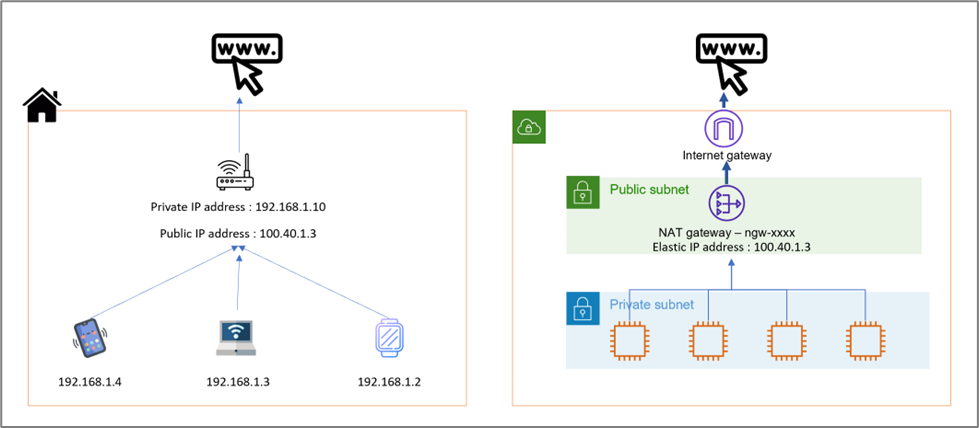
In AWS world, similar to home devices, workloads in a closed network or AWS Virtual Private Cloud (VPC) need not be launched in a public subnet. As a best practice, they should be placed in private subnet where each workload would have its own Private IP address. During the time they want to talk to internet, they could talk to AWS NAT Gateway, a scalable managed services from AWS, that would act like the home wifi router. A NAT Gateway is created in a public subnet and it needs an Elastic IP which would be its own Public IP address. It allows the private subnet workloads access the internet using this Public IP address but prevents any connection from the internet.
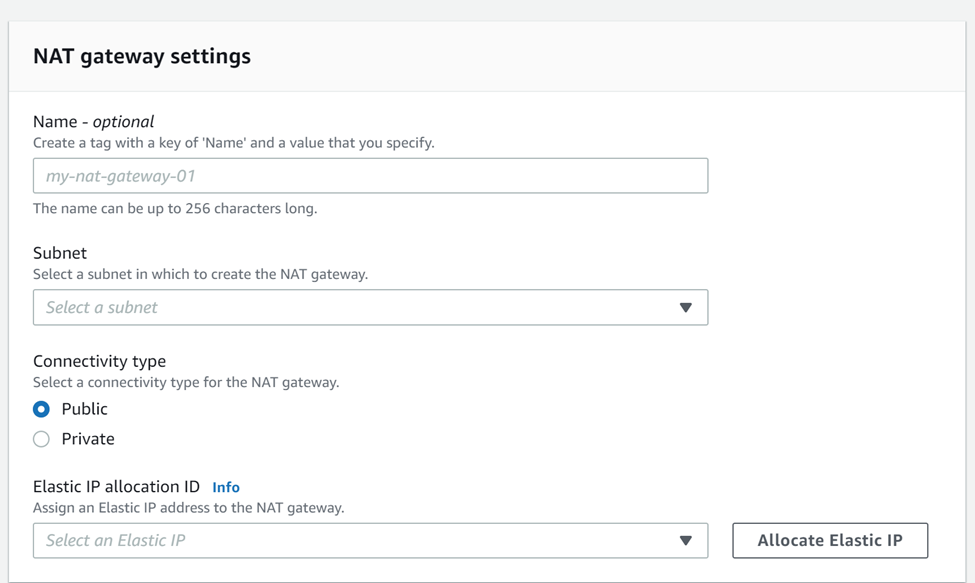
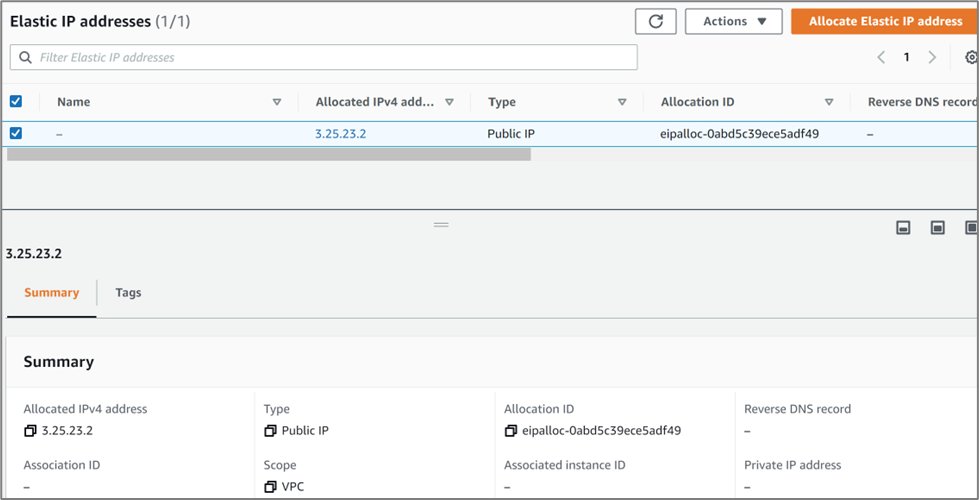
Creating a NAT gateway needs an Elastic IP address and a public subnet. The NAT gateway and the workloads using it should reside in separate subnets.
The route table associated with public subnet housing the NAT gateway should point the default route to the internet gateway.
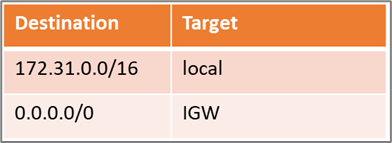
The route table associated with the private subnet housing the workloads should point the default route to the NAT Gateway.
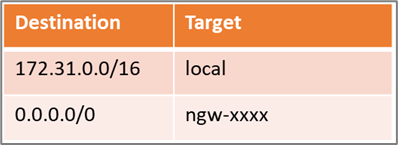
The network traffic would be initiated from the workloads through the NAT Gateway out to the internet. If there was a network packet initiated from the internet back to the workloads, the only IP address it would see would the Elastic IP address of the NAT gateway. The network packet would be dropped and not reach the workloads. This way, NAT Gateways offer a security layer to grant internal workloads access to the internet without being exposed to it.
Essence#2 : RFC 1918
Internet Engineering Task Force (IETF) is the leading Internet standards body that defines standard operating internet protocols. In the year 1996, IETF released a Request For Comments (RFC) documenting the range of reserved IP addresses that can be used in private networks which are not reachable from the internet. Any data packets sent to these IP addresses range would be dropped on the public internet. If an organization has a ne twork where devices need to communicate with each other over IP addresses without the need to connect with internet, they can be assigned with any of the below RFC 1918 Private IP address range.
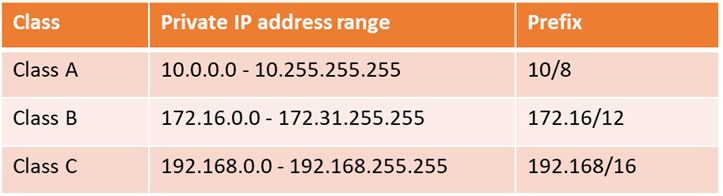
Next time, when you create a AWS VPC, you must specify IPv4 CIDR blocks from any of the above IP address range. Now you know the reason why the CIDR block for a default VPC is always 172.31.0.0/16. As a best practice, use addresses from different IP classes for production, UAT or DR regions VPC.
Essence#3: Autonomous Systems
What makes the internet work? I would say IP addresses and routing. Routing is the act of moving information across a network from a source to a destination. In a network of 4 computers, if each one of them needs to communicate with one another, it needs 6 connections to be made. This is not a scalable ap proach on larger networks. Instead, the computers can connect to a single router and each network can link to other networks via its router.
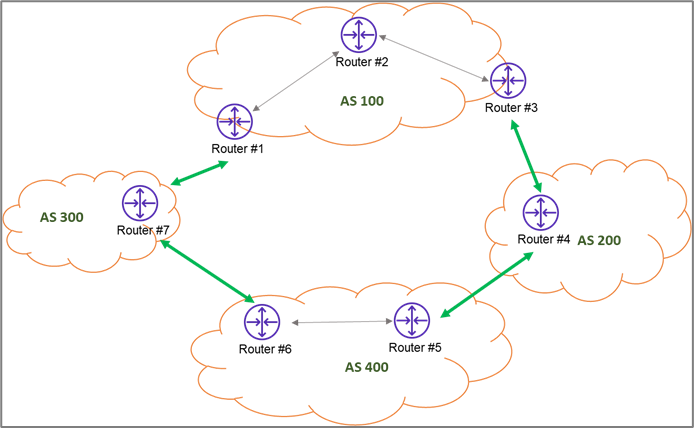
Ultimately, a network grows out to be a collection of routers forming an Autonomous System whose prefixes and routing policies are governed by a common administrative control or an organization. An organization can own one or many Autonomous Systems.
Autonomous Systems are defined as 16 bit integers which allowed a maximum of 65,536 assignments
(2 ^ 16). And then same story as IP addresses, this turned out to be insufficient and private AS numbers 64,512–65,534 were introduced. This was too small a range of nearly 1000 numbers to solve the shortage crisis. IETF released RFC 4893, which introduced 32-bit AS numbers, now allowing a maximum of 4,294,967,296 numbers possible in whic h 4200000000–4294967294 range of numbers are private AS numbers.
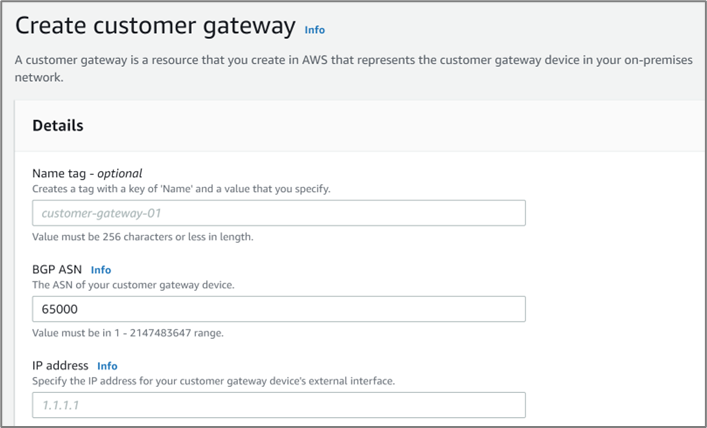
In AWS networking world, there are a number of places where you would see ASN being asked. One of them is when you create a customer gateway, you need to provide the ASN of the customer gateway device.
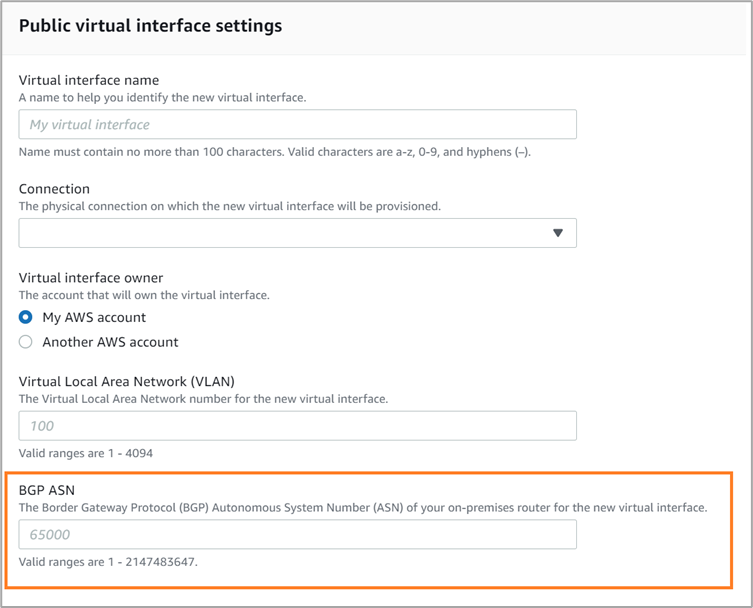
Also, in a hybrid cloud scenario, when you create a Virtual Interface (VIF) for a Direct Connect connection, the BGP ASN of the on-premises router needs to be given.
Another instance is when you configure an AWS Transit Gateway. You would be asked to provide the ASN for the Amazon side of a BGP session.

Click the "info" beside "Amazon side Autonomous System Number (ASN)", it would open a pop up window. I hope now it all makes sense to you.
Essence #4: Border Gateway Protocol (BGP)
Almost all the ASNs have something called BGP prefixed in the AWS console form. Border Gateway Protocol (BGP) is the fundamental protocol that Autonomous Systems use to figure out how to take a network packet and transmit it further to another AS or internet. It basically dictates the mechanism of routing decisions made by external facing routers that establish connection with other Autonomous Systems.
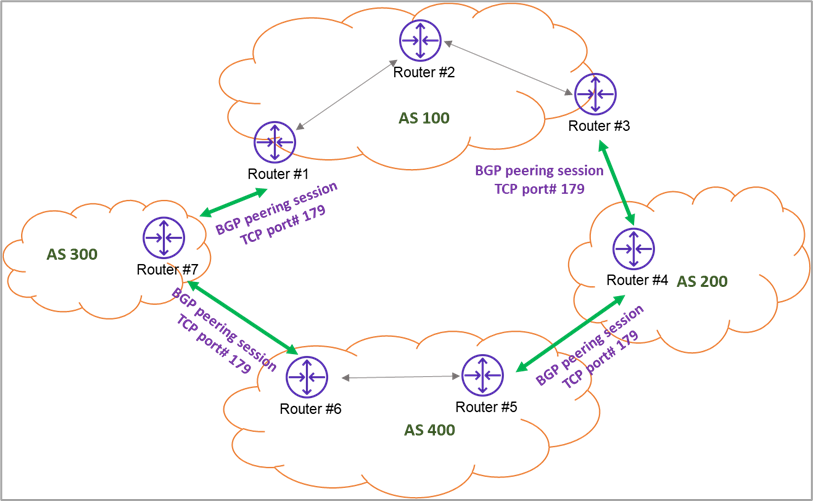
BGP resides on top of TCP protocol 179. In the above system, Router#1 belonging to AS 100 would use TCP port 179 to commun icate with Router#6 of AS 400. Pre-requisites for establishing a BGP session is that Router#1 and Router#7 should be peered and if the routers are behind a firewall, TCP port# 179 should be opened on both the sides else BGP will never establish a session. A BGP session established between routers within the same AS is called internal BGP (IBGP) and that between different AS is called external BGP (EBGP). In the cloud world, all we care about is EBGP that focus on determining the path a network packet should take to reach it's destination AS. That's why they are sometimes called Path Vector Routing protocols.
When two BGP peered routers advertise the routing information, they also advertise a series of constructs called Path Attributes (PA). This enables us to easily manipulate the BGP path selection to promote traffic engineering. One widely used use case would be creating active and passive tunnels between 2 ASNs (AWS Virtual Private Gateway and customer's gateway devic e are examples of two ASNs that could be connected) in a hybrid cloud scenario. The source and destination for both the tunnels is the same, with BGP you can manipulate the traffic in a way that based on certain conditions, tunnel #1 would be the primary path and when the conditions change, tunnel #2 would be the primary path. This tunability and scalability is what makes BGP the most preferred protocol not only by AWS cloud but also other CSPs worldwide. BGP has got a decision tree and an algorithm that determines how the network traffic would be sent.
BGP path algorithm deserves a separate attention in part#2 of this series along with some oranges and more networking essences. Too many essences in a single article could cause essence fatigue.
See you soon …
Essential Essences of AWS Cloud Networking was originally published in Towards AWS on Medium, where people are continuing the conversation by highlighting and responding to this story.
Comments
Post a Comment