Direct Connect — Part 2 — Public VIF
Direct Connect — Part 2 — Public VIF
First Post- https://raaki-88.medium.com/direct-connect-part-1-dc3e9369933
Direct Connect offering though it connects to AWS has a difference in operation depending on the VIF we connect.
Public VIF
→ So when we have this setup, this is in no way related to VPC at all, all this does is advertise Amazon-owned Public Prefixes for services like S3/EC2(Elastic-IP only, not your Private IP), and that's all to it.
→ There is flexibility at the customer end to scope the advertisement propagation t LOCAL, CONTINENT, and GLOBAL levels within AWS in an outbound direction and has the flexibility to filter inbound updates which are advertised toward him.
Here is by default, how the Community scope looks like, you also have the flexibility to filter routes inbound to customers.
Note: Outbound communi ties restrict the advertisement of prefixes to region/continent/global scope for any sort of Any-cast implementations.
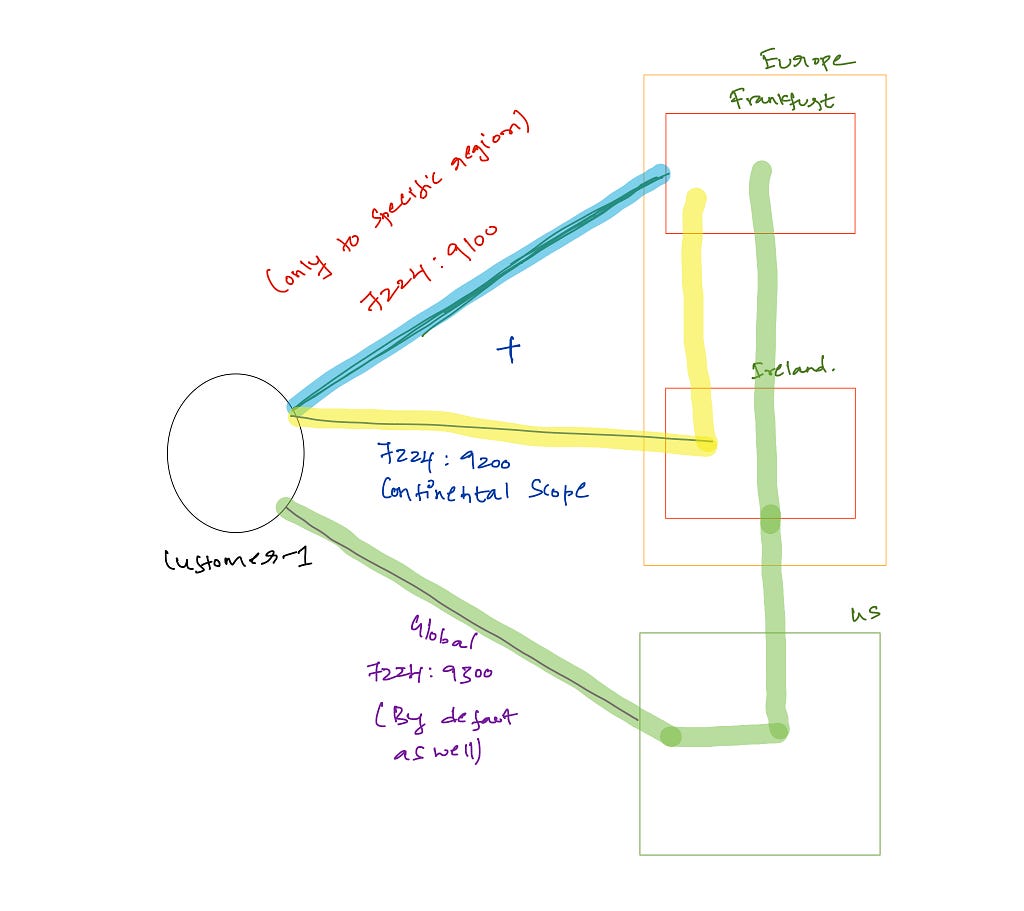
if the Customer sends a route with a community
7224:9100 → This will be local to the region
7224:9200 → This will be local to the continent, the scope is till the EU
7224:9300 → Global, by default its global even if you don't export with this community
How to Verify -
- The easiest way is to advertise your public routes and ping from the EC2 host in the region, depending on the community you will have reachability from Region/Continent or entire AWS Global regions.
Sample output from the routers on how prefixes would look in case of a Public VIF
lab-rout   er#show ip bgp summary
Neighbor        V           AS MsgRcvd MsgSent   TblVer  InQ OutQ Up/Down  State/PfxRcd
x.x.240.241  4         7224      93      44    90205    0    0 00:18:06     8024
lab-router#show ip route
2.0.0.0/24 is subnetted, 2 subnets
B        2.255.190.0 [20/10] via x.x.240.241, 00:18:12
B        2.255.191.0 [20/10] via x.x.240.241, 00:18:11
      3.0.0.0/8 is variably subnetted, 244 subnets, 10 masks
B        3.0.0.0/15 [20/10] via x.x.240.241, 00:18:12
B        3.2.0.0/24 [20/10] via x.x.240.241, 00:18:12
B        3.2.2.0/24 [20/10] via x.x.240.241, 00:18:12
B        3.2.3.0/24 [20/10] via x.x.240.241, 00:18:12
B        3.2.8.0/24 [20/10] via x.x.240.241, 00:18:12
B        3.2.9.0/24 [20/10] via x.x.240.241, 00:18:12
B        3.2.10.0/24 [20/10] via x.x.240.241, 00:18:12
B        3.2.11.0/24 [20/10] via x.x.240.241, 00:18:12
B        3.2.12.0/24 [20/10] via x.x.240.241, 00:18:12
B        3.2.13.0/24    [20/10] via x.x.240.241, 00:18:12
B        3.2.14.0/24 [20/10] via x.x.240.241, 00:18:12
B        3.2.15.0/24 [20/10] via x.x.240.241, 00:18:12
B        3.2.48.0/24 [20/10] via x.x.240.241, 00:18:12
...
Few Points:
- AWS Direct Connect Public VIFs provide a direct, private connection from your on-premises network to AWS.
- Public VIFs are available in all AWS Regions.
- You can use a public VIF to access any AWS service, including Amazon S3, Amazon EC2, and Amazon DynamoDB.
- Public VIFs use the AWS backbone network, which is a high-speed, low-latency network designed for mission-critical applications.
- You can use a public VIF to connect to multiple AWS accounts and VPCs in different Regions.
Direct Connect — Part 2 — Public VIF was originally published in Towards AWS on Medium, where people are continuing the conversation by highlighting and responding to this story.
Comments
Post a Comment