AWS -Introduction to Simple Storage Service(S3) — Console & Command Line Interface (CLI)

AWS -Introduction to Simple Storage Service(S3) — Console & Command Line Interface (CLI)

Amazon S3 has a simple web services interface that you can use to store and retrieve any amount of data, at any time, from anywhere on the web.

Pre-requisites :
  1. Basic Knowledge of Amazon Simple Storage Service (S3)
  2. Need AWS account with internet connection.
  3. Have AWS account or can sign in using Free Tier of AWS.
Creating and uploading S3 Buckets/Files ( Console ) :
  1. Click on services and Go to S3 > Create Bucket > Fill Bucket Name > Select Region > Enabled ACL > untick block all public access > enable the acknowledgement > Click on Create Bucket.
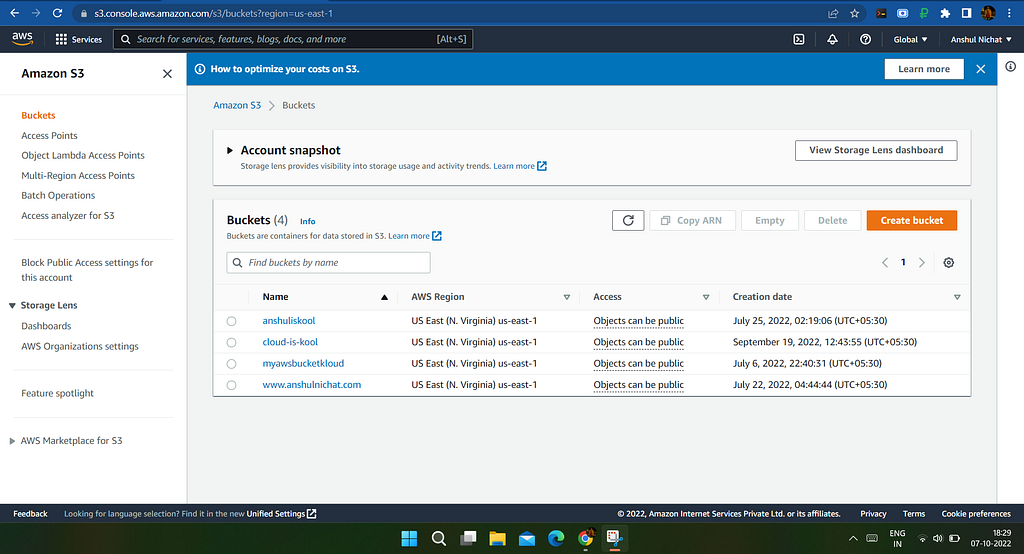
Screenshot from Amazon Console

2. Open Bucket which you created > Click Upload > Add Files/Folders > Enable Bucket Versioning > Go to Permissions and Tick Grant public-read access to enable public access of image > Go to properties and Select relevant storage Classes >Click on upload.
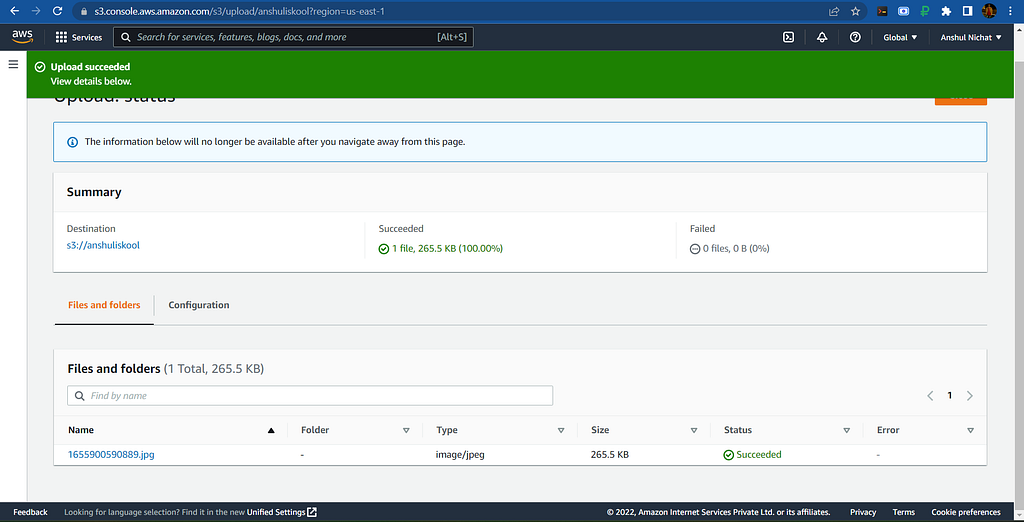
Screenshot from Amazon Console

3. Click on File and open Object URL and paste it in any browser and you� ��ll be able to see file.

Creating and uploading S3 Buckets/Files ( CLI ) :
  1. Launch VPC and EC2 in with atleast one public Cloud and open Extension SSH
  2. Now, use Below commands for installing CLI in SSH Shell

curl "https://awscli.amazonaws.com/awscli-exe-linux-x86_64.zip" -o "awscliv2.zip"
unzip awscliv2.zip
sudo ./aws/install

3. Go to IAM Roles > Create Users > User Credentials > Security Credentials > Create access key (Inside you'll get access key ID & Secret access key ID) > Copy it

4. Go to CLI and type ifconfigure and fill details Access Key ID, Secret Access Key ID , Zone ( us east-1) and Format As JSON.

5. To Create Bucket in S3 follow below commands :

5. Go to S3 and you can see that the Bucket is successfully created.

Points To Remember :

  1. S3 is a Global Service but Bucket is a Regional resource.
S3 url (folder) : https://bucketname.s3.region.amazonaws.com/foldername/objectname
S3 url (file) : https://bucketname.s3.region.amazonaws.com/objectname

2. Latency is the delay between a user's action and a web application's response to that action For example : ping google.com

3. Data lifecycle :

Standard : frequent access data as in accessing data on daily basis.

Standard-IA : infrequent access data as in accessing once in a 6 months.

Intelligent Tiering : According to you accessing frequenc y it'll Automatically sets data lifecycle.

Glacier/Deep Glacier : Coma/Almost dead as in accessing once in many years.

4. Bucket Versioning : It creates multiple variants of objects

For More details on Terminologies or Hosting Website using S3 you can visit here.


AWS -Introduction to Simple Storage Service(S3) — Console & Command Line Interface (CLI) was originally published in Towards AWS on Medium, where people are continuing the conversation by highlighting and responding to this story.

Namaste Devops is a one stop solution view, read and learn Devops Articles selected from worlds Top Devops content publishers inclusing AWS, Azure and others. All the credit/appreciations/issues apart from the Clean UI and faster loading time goes to original author.

Comments

Did you find the article or blog useful? Please share this among your dev friends or network.

An android app or website on your mind?

We build blazing fast Rest APIs and web-apps and love to discuss and develop on great product ideas over a Google meet call. Let's connect for a free consultation or project development.

Contact Us

Trending DevOps Articles

Working with System.Random and threads safely in .NET Core and .NET Framework

Popular DevOps Categories

Docker aws cdk application load balancer AWS CDK Application security AWS CDK application Application Load Balancers with DevOps Guru Auto scale group Automation Autoscale EC2 Autoscale VPC Autoscaling AWS Azure DevOps Big Data BigQuery CAMS DevOps Containers Data Observability Frequently Asked Devops Questions in Interviews GCP Large Table Export GCP Serverless Dataproc DB Export GTmetrix Page Speed 100% Google Page Speed 100% Healthy CI/CD Pipelines How to use AWS Developer Tools IDL web services Infrastructure as code Istio App Deploy Istio Gateways Istio Installation Istio Official Docs Istio Service Istio Traffic Management Java Database Export with GCP Jenkin K8 Kubernetes Large DB Export GCP Linux MSSQL March announcement MySQL Networking Popular DevOps Tools PostgreSQL Puppet Python Database Export with GCP Python GCP Large Table Export Python GCP Serverless Dataproc DB Export Python Postgres DB Export to BigQuery Sprint Top 100 Devops Questions TypeScript Client Generator anti-patterns of DevOps application performance monitoring (APM) aws amplify deploy blazor webassembly aws cdk application load balancer security group aws cdk construct example aws cdk l2 constructs aws cdk web application firewall aws codeguru reviewer cli command aws devops guru performance management aws service catalog best practices aws service catalog ci/cd aws service catalog examples azure Devops use cases azure devops whitepaper codeguru aws cli deploy asp.net core blazor webassembly devops guru for rds devops guru rds performance devops project explanation devops project ideas devops real time examples devops real time scenarios devops whitepaper aws docker-compose.yml health aware ci/cd pipeline example host and deploy asp.net core blazor webassembly on AWS scalable and secure CI/CD pipelines security vulnerabilities ci cd pipeline security vulnerabilities ci cd pipeline aws smithy code generation smithy server generator
Show more