Writing to Google Sheets from Workflows
In my previous post, I showed how to trigger a workflow in Google Cloud from a Google Sheets spreadsheet using Apps Script. In this post, I show how to do the reverse: write to Google Sheets from a workflow in Google Cloud.
Use case
Imagine you have some dataset in BigQuery. Periodically, you want to query and extract a subset of the dataset and save it to a Google Sheets spreadsheet. You can implement such a process with Workflows quite easily.
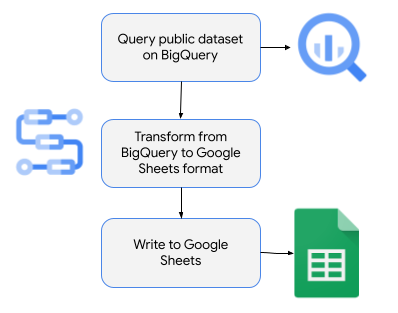
Let's take a look at the steps in detail.
Create a spreadsheet in Google Sheets
First, create a spreadsheet in Google Sheets that the workflow will write results to.
Once the sheet is created, note the spreadsheet id; you will need this in the workflow later. You can find the sheet id in the url of the spreadsheet:< /p>
For simplicity, you will deploy the workflow with the default compute service account. Find this service account email address in the IAM & Admin -> Service Accounts section of Google Cloud Console:

Make sure this service account has write permissions to the spreadsheet:

Explore the public BigQuery dataset
For this sample, you will use the usa_names.usa_1910_2013 public BigQuery dataset, which contains information on individuals in the United States from 1910 to 2013.
You can see the first 100 rows with this query:
SELECT *
FROM `bigquery-public-data.usa_names.usa_1910_2013`
LIMIT 100

You can find the 100 most popular names with this query:
SELECT name, gender, SUM(number) AS total
FROM `bigquery-public-data.usa_names.usa_1910_2013`
GROUP BY name, gender
ORDER BY total DESC
LIMIT 100
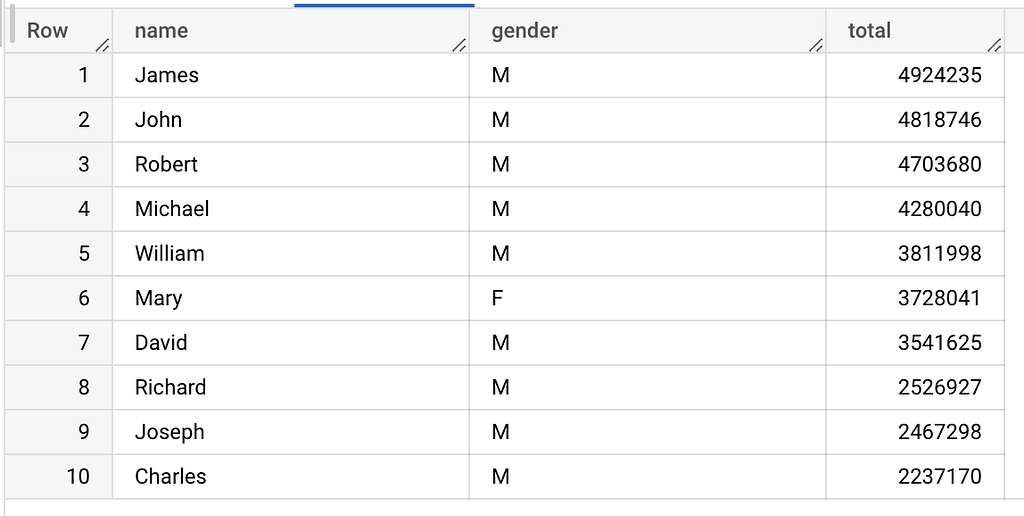
This is the query you will use in the sample workflow.
Create a workflow
Create a workflow.yaml to find the most popular names from the BigQuery public dataset and write to the spreadsheet in Google Sheets.
First, define your sheet id and limit:
main:
    steps:
    - init:
        assign:
        # Replace with your sheetId and make sure the service account
        # for the workflow has write permissions to the s   heet
        - sheetId: "1D8n7uoU8kGwQvR4rcLkF10CdAfnUKE2o0yl6P-Z7nfM"
        - limit: 100
Run the query against the BigQuery public dataset:
- runQuery:
        call: googleapis.bigquery.v2.jobs.query
        args:
            projectId: ${sys.get_env("GOOGLE_CLOUD_PROJECT_ID")}
            body:
                useLegacySql: false
                # Query name and gender of most popular names
                query: ${"SELECT name, gender, SUM(number) AS total
                    FROM `bigquery-public-data.usa_names.usa_1910_2013`
                    GROUP BY name, gender
                    ORDER BY total DESC
                    LIMIT " + limit}
        result: queryResult
Initialize a rows list, parse the query results, and insert each row into the rows list:
- init_header_row:
        assign:
        - rows:
            - ["Name", "Gender", &quo   t;Total"]
    - process_query_result:
        for:
            value: row
            in: ${queryResult.rows}
            steps:
            - process_each_row:
                assign:
                - name: ${row.f[0].v}
                - gender: ${row.f[1].v}
                - total: ${row.f[2].v}
                - row: ["${name}", "${gender}", "${total}"]
                - rows: ${list.concat(rows, row)}
Finally, clear any existing values in the spreadsheet and insert the rows using the Google Sheets API connector of Workflows:
- clear_existing_values:
        call: googleapis.sheets.v4.spreadsheets.values.clear
        args:
            range: "Sheet1"
            spreadsheetId: ${sheetId}
        result: clearResult
    - update_sheet:
        call: googleapis.sheets.v4.s   preadsheets.values.update
        args:
            range: ${"Sheet1!A1:C" + (limit + 1)}
            spreadsheetId: ${sheetId}
            valueInputOption: RAW
            body:
                majorDimension: "ROWS"
                values: ${rows}
        result: updateResult
    - returnResult:
        return: ${updateResult}
Deploy the workflow
Make sure you have a Google Cloud project and the project id is set in gcloud:
PROJECT_ID =your-project-id
gcloud config set project $PROJECT_ID
Run a setup.sh script to enable required services, and deploy the workflow defined in workflow.yaml with the default compute service account.
Run the worfklow
You're now ready to test the workflow.
Run the workflow from Google Cloud Console or gcloud:
gcloud workflows run read-bigquery-write-sheets
In a few seconds, you should see that the workflow execution has finished and the spreadsheet has the results from the query of the BigQuery dataset:

This is just one example of how to write to Google Sheets from Workflows using the Google Sheets API connector. You can also use the Google Forms API connector, which provides easy and interesting integration opportunities between Workflows and Google Forms and a whole suite of Google Workspace RES T APIs that you can call from Workflows with relative ease even without a connector.
For questions or feedback, feel free to reach out to me on Twitter @meteatamel.
Originally published at https://atamel.dev.
Writing to Google Sheets from Workflows was originally published in Google Cloud - Community on Medium, where people are continuing the conversation by highlighting and responding to this story.
Comments
Post a Comment