Using PathBase with .NET 6's WebApplicationBuilder
In this post I describe the difficulties of adding calls to UsePathBase with .NET 6 WebApplication programs, and describe two approaches to work around it.
Recap: UsePathBase() and routing

In my previous post I described how PathBase works with Path to keep track of the "original" HTTP request path, removing "prefixes" from the path which are sometimes necessary for proxies etc. By adding UsePathBase() in your middleware pipeline, yo u can strip off these prefixes, so your routing works correctly.
I demonstrated an app that uses UsePathBase() in conjunction with routing that looked something like the following:
public void Configure(IApplicationBuilder app) { app.UsePathBase("/myapp"); app.UseRouting(); app.MapGet("/api1", (HttpContext ctx, LinkGenerator link) => $"API1: PathBase: {ctx.Request.PathBase} Path: {ctx.Request.Path}"); app.MapGet("/api2", (HttpContext ctx, LinkGenerator link) => $"API2: PathBase: {ctx.Request.PathBase} Path: {ctx.Request.Path}"); } You can call API1 by using both /myapp/api1 or /api1, and the endpoint routing system will route the request correctly:

Ideally the UsePathBase() call is placed first in your middleware pipeline, but it's very important that UsePathBase() is placed before UseRouting(). Otherwise, your routing won't work correctly!
But the example app I've shown above is for a pre-.NET 6-style Startup class. What if we try something similar with .NET 6's WebApplication approach?
Breaking your PathBase with WebApplication
.NET 6 introdu ced a new concept, sometimes called "minimal hosting", which aims to dramatically simplify the boilerplate code required to get started with ASP.NET Core applications. This new approach is cantered around the WebApplication and WebApplicationBuilder types.
I discussed these types extensively in a series last year. If these are new to you, I strongly suggest reading "Comparing WebApplicationBuilder to the Generic Host" and "Building a middleware pipeline with WebApplication" at least.
WebApplication aims to make it easier to add both middleware and endpoints simply. For example, we can create a minimal API using just the following code
WebApplicationBuilder builder = WebApplication.CreateBuilder(args); WebApplication app = builder.Build(); app.UseHttpsRedirection(); app.UseStaticFiles(); app.MapGet("/", () => "Hello World!"); app.Run(); This isn't a snippet, this is the all the code, which builds a middleware pipeline that looks something like this:

There's some important features visible in the diagram, most notably, that WebApplication automatically adds several pieces of middleware to your pipeline:
HostFilteringMiddlewareDeveloperExceptionPageMiddlewareEndpointRoutingMiddleware(AKARoutingMiddleware)EndpointMiddleware
If we were building the pipeline with the Startup design, we would have had to add all these ourselves, but WebApplication always adds these for you. Any middleware you add to the pipeline is added between the RoutingMiddleware and the
Have you spotted the problem?
If we naively try to convert our example application from the start of this post to .NET 6 WebApplicationBuilder we might end up with something like this:
WebApplicationBuilder builder = WebApplication.CreateBuilder(args); WebApplication app = builder.Build(); app.UsePathBase("/myapp"); app.MapGet("/api1", (HttpContext ctx, LinkGenerator link) => $"API1: PathBase: {ctx.Request.PathBase} Path: {ctx.Request.Path}"); app.MapGet("/api2", (HttpContext ctx, LinkGenerator link) => $"API2: PathBase: {ctx.Request.PathBase} Path: {ctx.Request.Path}"); app.Run(); Which builds a pipeline something like this:

But at the end of the last section I said
…it's very important that
UsePathBase()is placed beforeUseRouting()…
and we've already seen that WebApplication places any extra middleware after the UseRouting() call. With the set up above, calls to /myapp/api1 aren't going to be routed to API1, they're going to return a 404 😞
Option 1: Controlling the location of UseRouting()
There are a couple ways around this problem. Th e first of these is the easiest conceptuallyâ€"change where UseRouting() is in the pipeline.
In the previous section I showed that the call to UseRouting() is added automatically by WebApplication just before your additional middleware. However, in my previous post I showed that it's possible to change this behaviour and regain control over UseRouting().
The simple solution is to add UseRouting() wherever you need it to be. WebApplication will detect that you've added UseRouting() yourself, and will turn the other instance into a no-op. So you can write your application like this:
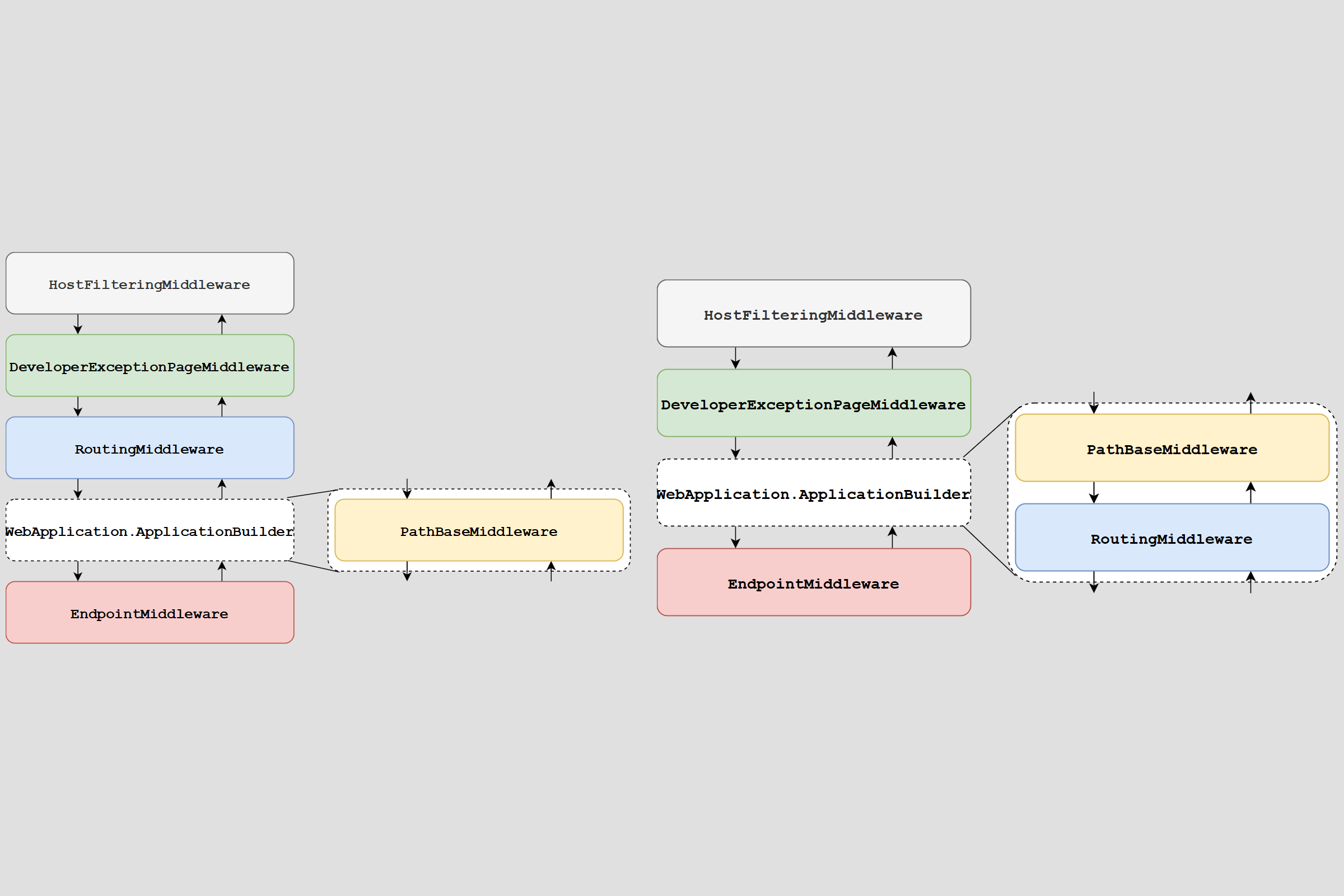
WebApplicationBuilder builder = WebApplication.CreateBuilder(args); WebApplication app = builder.Build(); app.UsePathBase("/myapp"); app.UseRouting(); // ðŸ'ˆ Add explicitly app.MapGet("/api1", (HttpContext ctx, LinkGenerator link) => $"API1: PathBase: {ctx.Request.PathBase} Path: {ctx.Request.Path}"); app.MapGet("/api2", (HttpContext ctx, LinkGenerator link) => $"API2: PathBase: {ctx.Request.PathBase} Path: {ctx.Request.Path}"); app.Run(); and with this change, your middleware pipeline will now (effectively) look like this:

so the call to UsePathBase is before UseRouting, and your PathBase routing should work again 🎉
This is the simplest option, but there's another possibility, which may be useful in some circumstances
Option 2: Using a startup filter to add the UsePathBase middleware
The other approach you can use is to use an IStartupFilter to add the PathBaseMiddleware even earlier in your middleware pipeline.
I haven't talked about
IStartupFilterfor a while, but I have an introductory post on them here. It's from 2017, so some of the information is out of date, but the concepts are still the same.
You can use IStartupFilter to add middleware to a pipeline by using dependency injection, instead of adding them to the pipeline directly. This enables you to do things like
- Create a NuGet package that exposes an
AddMiddleware()function which automatically sets up your middleware pipeline correctly. This can be useful if you have to maintain multiple apps in an organisation. - Add hooks early in the application startup.
- Run a function every time a user adds middleware to the pipeline.
- Add middleware earlier than you would normally be able to.
It's that last point we're going to use here.
We'll start by creating our custom IStartupFilter. This class takes a pathBase string in the constructor, and then when executed, it prepends the PathBaseMiddleware to the pipeline, using the provided prefix:
public class PathBaseStartupFilter : IStartupFilter { private readonly string _pathBase; public PathBaseStartupFilter(string pathBase) { _pathBase = pathBase; } public Action<IApplicationBuilder> Configure(Action<IApplicationBuilder> next) { return app => { app.UsePathBase(_pathBase); // ðŸ'ˆ Adds the PathBaseMiddleware next(app); // before the other middleware }; } } We can then add the IStartupFilter to our application as a service like this:
WebApplicationBuilder builder = WebApplication.CreateBuilder(args); // ðŸ'‡ Add the IStartupFilter builder.Services.AddSingleton<IStartupFilter>(new PathBaseStartupFilter("/myapp")); WebApplication app = builder.Build(); app.MapGet("/api1", (HttpContext ctx, LinkGenerator link) => $"API1: PathBase: {ctx.Request.PathBase} Path: {ctx.Request.Path}"); app.MapGet("/api2", (HttpContext ctx, LinkGenerator link) => $"API2: PathBase: {ctx.Request.PathBase} Path: {ctx.Request.Path}"); app.Run(); when run, this builds a middleware pipeline that looks something like this:

Note that this adds the PathBaseMiddleware early in the pipeline, though not at the start. This is because the HostFilteringMimddleware is also added using an IStartupFilter and the final order in the pipeline is the same order as the IStartupFilter are added to the dependency injection container.
Nevertheless, this is plenty early enough for our use case, and we can happily call /myapp/api1 and see our request routed to the correct location.
Let's go one step further, and make the PathBaseStartupFilter a shareable component by adding IOptions<> to it.
Configuring the PathBaseStartupFilter using IOptions
The example in the previous section is perfectly good for one-off configuration, but one of the benefits of using PathBase and the PathBaseMiddleware is being able to control the prefix at runtime, without having to rebuild your app.
To take this approach, we need to move the /myapp prefix into configuration. We can create a simple POCO object to represent the settings as follows:
public class PathBaseSettings { public string ApplicationPathBase { get; set; } } And then we can update the PathBaseMiddleware to use the strongly-typed configuration via the IOptions pattern:
public class PathBaseStartupFilter : IStartupFilter { private readonly string _pathBase; // ðŸ'‡ Takes an IOptions<PathBaseSettings> instead of a string directly public PathBaseStartupFilter(IOptions<PathBaseSettings> options) { _pathBase = options.Value.ApplicationPathBase; } public Action<IApplicationBuilder> Configure(Action<IApplicationBuilder> next) { return app => { app.UsePathBase(_pathBase); next(app); }; } } Next we can add the configuration to our appsettings.json (for example, in practice you would likely load this from environment variables or some other configuration source):
{ "PathBaseSettings": { "ApplicationPathBase": "/myapp" }, // Other config } and finally we update our app to use the configuration and the IStartupFilter:
WebApplicationBuilder builder = WebApplication.CreateBuilder(args); // ðŸ'‡ Add the IStartupFilter using the helper method AddPathBaseFilter(builder); WebApplication app = builder.Build(); app.MapGet("/api1", (HttpContext ctx, LinkGenerator link) => $"API1: PathBase: {ctx.Request.PathBase} Path: {ctx.Request.Path}"); app.MapGet("/api2", (HttpContext ctx, LinkGenerator link) => $"API2: PathBase: {ctx.Request.PathBase} Path: {ctx.Request.Path}"); app.Run(); // Helper method to add the configuration static void AddPathBaseFilter(WebApplicationBuilder builder) { // Fetch the PathBaseSettings section from configuration var config = builder.Configuration.GetSection("PathBaseSettings"); // Bind the config section to PathBaseSettings using IOptions builder.Services.Configure<PathBaseSettings>(); // Register the startup filter builder.Services.AddTransient<IStartupFilter, PathBaseStartupFilter>(); } I've shown the adding of the configuration and IStartupFilter as a helper method because this is something you could share between your applications (I would suggest making it an extension method; I didn't here because it's a little complicated in top-level programs).
The end result is the same as before, but this approach is a little more generalised, which makes it more conducive to sharing between multiple teams.
Summary
In this post I described the difficulties of adding the PathBaseMiddleware with .NET 6 WebApplication programs. WebApplication adds a call to UseRouting() just before your middleware by default, which is too early if you manually call UsePathBase(). I showed that you can work around this either by calling UseRouting() manually after the call to UsePathBase(), or by using an IStartupFilter to insert the PathBaseMiddleware earlier in the middleware pipeline.
Comments
Post a Comment