Istio Service Mesh 101 Part - (2/3)

Istio Service Mesh 101 — Part (2/3)
Welcome back to another part of the Istio Service Mesh 101 series. In the previous blog, we learnt about Istio and its installation. We also saw how an application can be deployed using Istio. In this blog, we will look into traffic management and briefly hover around the security concepts in Istio.
We had set up a Service Mesh using Istio and deployed a sample application in the previous article. Now, we want to make it accessible to external users. For this demo, the product page is what the users need to access.
How do we make it accessible?
Let's say we need to access the website using http://bookapp.com and it should show the p roduct page that shows the details about the products listed.
How do we enable this?
Using Kubernetes, we can use Ingress resources to control the traffic coming into the cluster. We can use an Ingress Controller like NGINX Controller for this purpose and define a set of rules for routing the traffic to the service. Istio supports Kubernetes Ingress but they also offer another approach that they recommend, which also provides more features by Istio such as advanced monitoring and routing rules. This service is called Istio Gateway.
Gateways
Istio Gateways are load balancers that are placed at the edge of the service mesh.
They are the main configurations that manage the inbound and outbound traffic to the service mesh. As we discussed in the previous lecture about installing Istio in the cluster, the Istio is installed in a namespace called istio-system and has 3 components.
1. Istiod
2. Istio-ingressgateway
3. Istio-egressgateway
While Istiod is the daemon, the other two are Istio gateway controllers. While Istio-ingressgateway manages all the inbound traffic into these services, Istio-egressgateway manages all outbound traffic from these services. While ingress on Kubernetes is deployed using controllers like NGINX, Istio deploys these gateway controllers using the Envoy proxies.
But, keep in mind that these gateway controllers are separate standalone proxies from the proxies installed in each of the services.
You can also have your own set of custom gateway controllers.
Now, let's get back to the application. We need to get the traffic coming to this gateway and route it to the hostname where the product page lies. For that, we need to first create a Gateway object.
Create an ingress-gateway.yaml
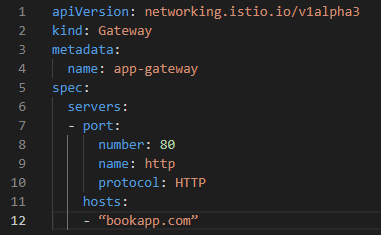
You can also add the following code to the spec section if you have multiple ingress controllers.

Once we have the YAML file, we can run:
kubectl apply -f ingress-gateway.yaml
To list the gateway, use
kubectl get gateway
We have a gateway now. How do we route the traffic to the services? This is where Virtual services come into play.
Virtual Service
Virtual service defines a set of routing rules for traffic coming from the ingress gateway into the service mesh.
With virtual services, you can manage different versions of the service and specify traffi c behaviour for one or more hostnames. When a virtual service is created, the Istio control plane passes the configuration to all the Envoy proxies installed in the sidecar containers.
Create a virtual-service.yaml
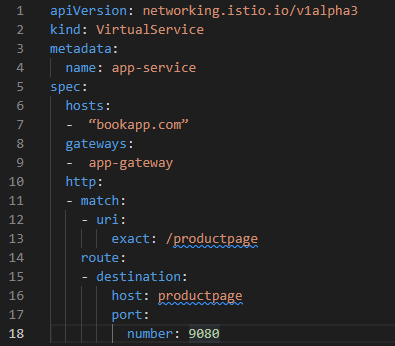
This way we'll be able to access the product page. Now, imagine if we have multiple versions of the review service, say 2 versions v1 and v2. You need to split traffic into each version. On Kubernetes way, you'd add replicas in the deployment just like a canary deployment. But that only splits the traffic with these pods.
What if you want to redirect only a certain percentage of the traffic?
This is where Istio extends the traffic splitting feature of Virtual Services.
Modify your virtual service YAML file by editing the destination block as shown below:

The weight parameter ensures that only 5% of the traffic flows to the v2 version of the application. Great! But, what is a subset? This is where Destination rules come into action.
Destination Rule
The destination rule applies router policies after the traffic is routed to a specific service.
Let's talk about that on a deeper level. We talked about subsets in virtual services. How are they defined and where?
Subsets are defined in destination rules. So, let's create a destination rule.
Create dest-rule.yaml
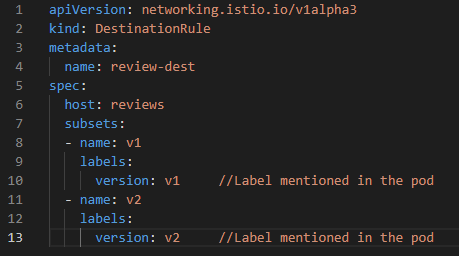
By default, Envoy load balances using a ROUND_ROBIN algorithm but, this can also be customized. The various algorithm option s are ROUND_ROBIN, PASSTHROUGH, LEAST_CONN, and RANDOM. This can also be mentioned by adding the following code under the spec section of the destination rule.
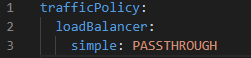
We also have the privilege to set the traffic policy at the subset level. There are also other options like TLS instead of configuring the load balancer.
Visit the Istio documentation for reference.
Fault Injection
So far, we have configured everything and the application is running smoothly. But how do we check for error handling mechanisms?
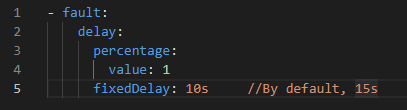
This is where we use fault injection. It helps us in identifying if the policies defined run efficiently and don't restrict too much. Errors can be injected via virtual servic es. There are two types of errors: delay, and abort.
To induce a delay, add the following code under spec.http section
To induce an abort, add the following code under spec.http section
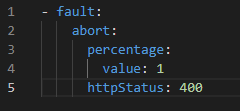
Abort will simulate errors by rejecting requests and returning error codes.
Timeouts
We can configure timeouts at the service level to fail so that the depending services don't get requests queued up.
For adding timeouts, use the following code under the spec section in the Virtual Service YAML file:
timeout: 5s
To te st it, use fault injection on another service that has a dependency on this service.
Retries
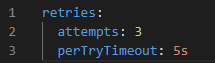
You can configure retries if you want a virtual service to attempt an operation again. For that, use the following under the spec.http section on the virtual service YAML file:
If a service breaks down, all the requests to that service will get piled up and create a delay in response. In those cases, such requests should be marked as failed immediately. This process is known as Circuit Breaking.
This will allow us to create resilient microservices applications that limit the impact of failures or any network issues.
For circuit breaking, add the following code under spec.subsets.trafficPolicy section in the destination rule YAML file:

Now, let's also take a brief overview of how security works on Istio.
Security Overview
Microservices have certain security requirements. When a service communicates with another service, it's a possibility that a hacker can interfere with the communication and modify the request. This is known as a man-in-the-middle attack. To prevent this, traffic needs to be encrypted. Access controls are implemented to restrict access to each of the services. Istio implements access controls using Mutual TLS and fine-grained access policies. In addition, Istio also provides support for audit logs. We'll discuss them in detail in the next blog.
Read part 1 here: Istio Service Mesh 101 — Part (1/3)
I hope this help us! Have a great day! Cheers!
Istio Service Mesh 101 — Part (2/3) was originally published in Google Cloud - Community on Medium, where people are continuing the conversation by highlighting and responding to this story.
Comments
Post a Comment