Handling concurrent merges to master in multi-stage Azure DevOps pipelines
In this post I describe a problem we were seeing in our large Azure DevOps pipeline, where a merge to master would cause PR builds to break mid-run. I describe the problem, why it occurs, and the solution we took to fix it.
This is definitely a niche issue, but it was causing us headaches more often than we liked. The workaround I describe in this post, while not pretty, solved all our issues!
Background: Multi-stage Azure DevOps pipelines

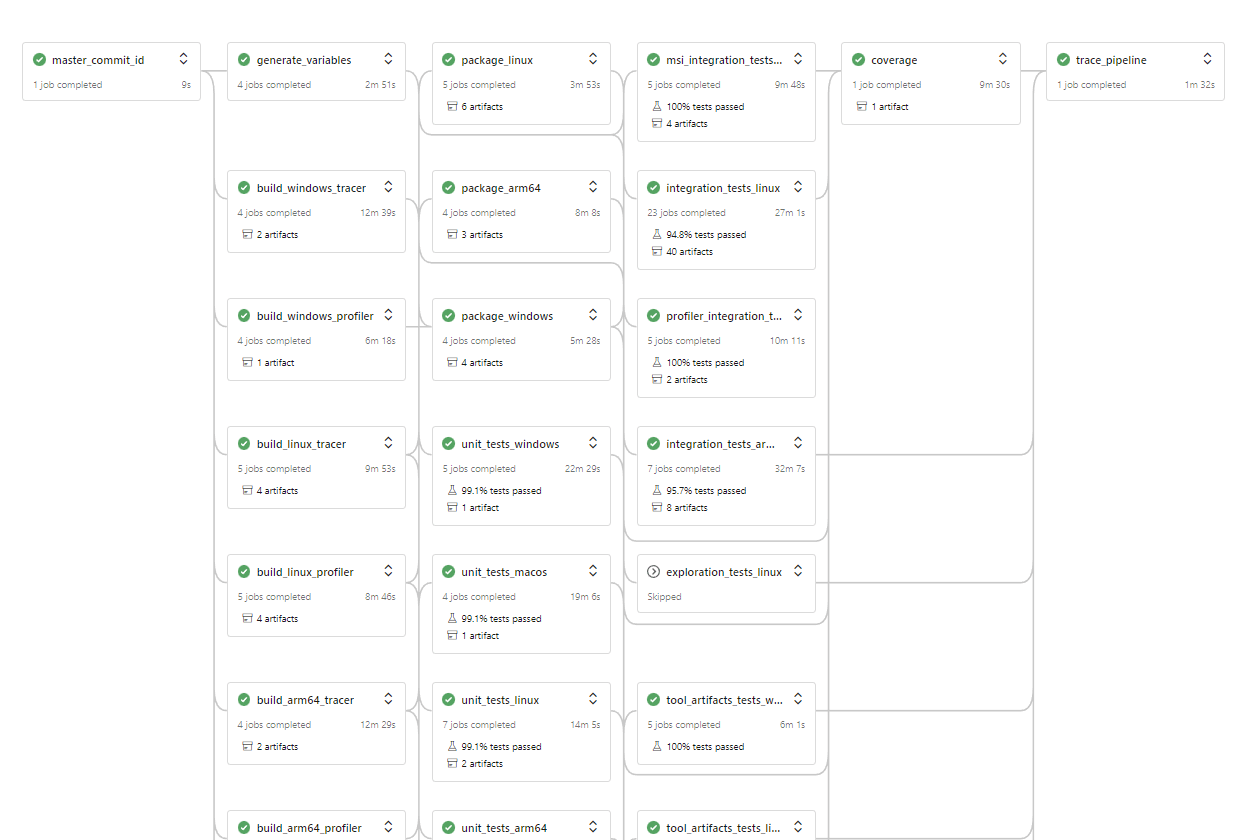
At work on the Datadog .NET APM Tracer, we have a big Azure DevOps pipeline. I tried to fit the whole thing into the overview below, but it's just too big!

The reason it's so large is that we have to test on a lot of platforms, and support a lot of frameworks. So as a vague overview we have to:
- Build the tracer on all the supported platformsâ€"Windows (x64 and x86) and Linux (x64, musl x64, arm64).
- Run unit tests for each platform, against all the supported frameworks (.
net461,netcoreapp2.1,netcoreapp3.0, etc). - Run unit tests for each platform, against all the supported frameworks (.
net461,netcoreapp2.1,netcoreapp3.0, etc). - Build installers for Windows (MSI, NuGet,
dd-trace) and Linux (deb, rpm, tar etc) - Run smoke tests for all the installers against a range of supported OSes
- Run benchmarks
- Run throughp ut tests
- etc
Each of those steps is a different "Stage" in Azure DevOps, and each platform/framework permutation within a stage is a separate "Job". We have dependencies between different stages (e.g. the testing stages depend on the build stages, the smoke tests depend on the installer stages etc), so you end up with a directed acyclic graph, as shown in the previous diagram.
Each Job in Azure Devops runs on a separate host, so we can parallelize the majority of work that happens in a stage. The downside to that is that each job does a fresh clone of the repository, and has to re-download all the assets and artifacts it needs from previous jobs. But short of running everything in a single stage (completely impractical), we don't really have a lot of choice other than using a multi-stage setup.
Background: GitHub pull requests and phantom merge com mits
Our Azure DevOps pipeline builds every pull request (PR) that gets created in GitHub. We have some GitHub Actions too, but for Reasonsâ„¢, most of the build happens in Azure DevOps.
When the PR is created, GitHub sends a webhook to Azure via the DevOps/GitHub integration, containing details about the pull request, such as the pull request number, the branch, and the commit.
This is where things get…tricky.
When you create a PR, GitHub creates a "merge" branch, separate to the branch you created the PR with, called something like refs/pull/:prNumber/merge. It then does a git merge between this branch and your master/main branch, and it's that commit which is sent to Azure DevOps
For example, imagine you have a branch called test. You push it to GitHub, and create a PR, let's say PR number 3. GitHub then creates a pull/3/merge commit, and does a git merge. It's the commit with SHA 582984347 in the example below that gets tested in your CI, not the test branch:

The "merge branch" behaviour is described in the GitHub documentation, but it's not very intuitive, and if you aren't aware of it, it will likely bite you at some point, but in most cases, it does make sense.
Essentially, you don't want to test the branch, you want to test the impact of the branch after it's merged to the main branch. Testing the merge commit does this (and it has the same effect whether you use merge, rebase, or squash).
The problem: a merge to master while a run is happening
Where things get tricky is if someone merges to master after you've created your PR. When this happens, GitHub refreshes all of the merge branches. If the master/main branch changes, then the git merge for all the PR branches must change too.
This normally doesn't have an impact on any existing PRs. If there is a running build for a PR, it will continue to use the previous merge commit, but if you push to the branch again, or restart the build, you will get the new merge commit. No problem.
The problems arise if you have a big multi-stage build, like we do…
The problem is that for each stage in our pipeline, we do a checkout using Azure DevOps' built-in checkout action. If someone merges to master while a build is on-going. different stages of the build will use different merge commits.
This would lead to scenarios like the following:
- A PR is created.
- Azure DevOps checks out the merge commit, and starts the build stages.
- Someone merges to master that adds a new feature, and adds additional tests for the feature.
- The build stages of the PR complete.
- The test stages start, and check out the new merge commit
- The tests for the new feature fail because the binary built in the build stages was built using a commit that didn't include this feature.
Fundamentally the problem is that Azure DevOps doesn't use a consistent commit across build stages. This is so painful to deal with when you have a long CI process like we do 😩
In the next section you'll see how we decided to hack around it.
The workaround : use a consistent commit ID
The solution we came up with involved three pieces:
- Don't use Azure DevOps's built-in
checkoutcommand, use a custom one instead - Add an additional stage at the start of the pipeline, on which all others depend, that records the commit ID of the
masterbranch at the start of the pipeline. - In stages that need to checkout, do a manual
git mergebetween the PR branch being tested and the commit ID recorded. This ensures a consistent code base is tested across all stages.
If you think this sounds convoluted, yeah, you're right. Don't use this is if you don't need it!😃 But we haven't had any issues related to concurrent merges to master since.
Fir st of all, we have the extra stage, which grabs the commit ID of the master branch
- stage: master_commit_id dependsOn: [] jobs: - job: fetch pool: vmImage: ubuntu-18.04 steps: - checkout: none - bash: | git clone --quiet --no-checkout --depth 1 --branch master $BUILD_REPOSITORY_URI ./s cd s MASTER_SHA=$(git rev-parse origin/master) echo "Using master commit ID $MASTER_SHA" echo "##vso[task.setvariable variable=master;isOutput=true]$MASTER_SHA" failOnStderr: true displayName: Fetch master id name: set_sha This stage consists of a single job that uses the Azure DevOps build variable BUILD_REPOSITORY_URI and does a shallow clone of the git repository. It then uses git rev-parse origin/master to extract the current commit ID of the master branch, and writes that to an output variable. Subsequent stages can access this variable, as you'll see shortly.
Next, we need to create our custom checkout implementation. As we reuse this in every stage, I created a template called clone-repo.yml, and added the following. There's a lot to this file so I'll give an overview subsequently:
parameters: - name: masterCommitId type: string steps: - ${{ if endsWith(variables['build.sourceBranch'], '/merge') }}: - checkout: none - bash: | # As this is a pull request, we need to do a fake merge # uses similar process to existing checkout task prBranch=$SYSTEM_PULLREQUEST_SOURCEBRANCH echo "Checking out merge commit for ${{ parameters.masterCommitId }} and $prBranch" git version git lfs version echo "Updating git config ..." git config init.defaultBranch master echo "Initializing repository at $BUILD_REPOSITORY_LOCALPATH ..." git init "$BUILD_REPOSITORY_LOCALPATH" echo "Adding remote $BUILD_REPOSITORY_URI ..." git remote add origin "$BUILD_REPOSITORY_URI" git config gc.auto 0 git config --get-all http.$BUILD_REPOSITORY_URI.extraheader git config --get-all http.extraheader git config --get-regexp .*extraheader git config --get-all http.proxy git config http.version HTTP/1.1 echo "Force fetching master and $prBranch ..." git fetch --force --tags --prune --prune-tags --progress --no-recurse-submodules origin +refs/heads/master:refs/remotes/origin/master +refs/heads/$prBranch:refs/remotes/origin/$prBranch echo "Checking out $prBranch..." git checkout --force $prBranch echo "Resetting $prBranch to origin/$prBranch ..." git reset origin/$prBranch --hard echo "Running git clean -ffdx ..." git clean -ffdx displayName: checkout - bash: | echo "Updating credentials ..." git config user.email "gitfun@example.com" git config user.name "Automatic Merge" echo "Merging $prBranch with ${{ parameters.masterCommitId }} ..." git merge ${{ parameters.masterCommitId }} mergeInProgress=$? if [ $mergeInProgress -ne 0 ] then echo "Merge failed, rolling back ..." git merge --abort exit 1; fi echo "Merge successful" git status displayName: merge - ${{ else }}: - checkout: self clean: true This template takes a masterCommitId as a parameter, which the calling job provides. That keeps this template relatively "standalone".
The first thing the template does is check if we're building a git branch that ends in /merge. If we are, we assume we're building in a PR branch, and we do the custom checkout. If not, then we fallback to a "standard" checkout to avoid the complexity of handling multiple scenarios. It's only the merge-branch scenario we handle here.
Checking for the
/mergesuffix is a bit crude, but it's worked for us in practice. You could easily take a different route based on other parameters if you prefer
If we're testing a PR, then we explicitly set checkout:none to skip Azure DevOps's implicit checkout. We then configure the git repo with various settings (I mostly just copied what the default checkout:self does). Next we do a git fetch to pull in the master branch and the original PR branch (i.e. not the merge branch). We then checkout the PR branch and clean/reset (to make sure our self-hosted runners are reset correctly).
In the next step we do the actual merge. Merging requires git credentials, so we add some dummy ones (we're not going to actually commit anything here), and then run git merge using the masterCommitId. Finally, we check that the merge was actually successful, and if so, we're done!
To use the task in a build stage, you should do three things:
- Add a dependency on
master_commit_idfor the stage - Grab the output ID from the
master_commit_idstage - Call the template by passing the relative path to the definition.
For example, for our build stage, we have this:
- stage: build_windows_tracer dependsOn: [master_commit_id] # depend on the master_commit_id stage variables: masterCommitId: $[ stageDependencies.master_commit_id.fetch.outputs['set_sha.master']] # grab the stage output jobs: - job: build pool: vmImage: windows-2019 steps: - template: steps/clone-repo.yml # Call the template providing the relative path parameters: masterCommitId: $(masterCommitId) # inject the commit ID # ... With these changes, we no longer had issues with our PR builds breaking because someone merged to master! If you're interested you can see the PR where I originally implemented it here, though we tweaked some things subsequently, as shown in this post.
Limitations
There are two main arguments against using the approach described in this post:
- Surely this should be the default behaviour in Azure DevOps?
- It's complicated and convoluted.
- A PR isn't tested against the latest
mastercommit, just whatever the branch was when the build started.
The first point is easy: yeah, it should. It feels kinda weird that it isn't, but I presume there are technical reasons that it works like this.
The second point is also easy: yes, it's complicated. If you don't need this, don't do it. I hope you don't have to use it. I considered other options to avoid it, but they all ran into other road blocks, so this was the easiest approach in the end.
The third point is more subtle, but yes, you're right. It's tested against a point in time. But that's also true without this fix. If you build a PR, the build finishes, and then someone merges to master, your PR build may pass, but it also wasn't tested against the latest master. Nothing about that changes in this PR.
You can avoid this and enforce PRs are always up to date in GitHub (see this post for details). The downside (and the reason we haven't implemented it), is it could add a lot more pressure to your CI, with every PR needing to be rebuilt whenever anyone merges to master.
All my fix does is ensure we use a consistent commit for a PR. For that, it works well.
Well, it works, anyway.
Summary
In this post I describe a problem with multi-stage Azure DevOps builds where someone committing to the master branch while a PR branch is building causes the PR to use different code for different parts of the build. I solved the issue by recording the commit ID of the master branch at the start of the build, and manually doing git checkout and git merge at the start of each stage. This ensured a consistent code checkout in every stage.
Comments
Post a Comment