Exporting data from Redshift to GCS — using GCP Dataproc Serverless and PySpark
Exporting data from Redshift to GCS — using GCP Dataproc Serverless and PySpark

Dataproc Serverless lets you run Spark batch workloads without requiring you to provision and manage your own cluster. The service will run the workload on a managed compute infrastructure, autoscaling resources as needed. Specify workload parameters, and then submit the workload to the Dataproc Serverless service.
Dataproc Templates provides solutions to common use-cases runs on Dataproc Serverless using Java and Python, lets us customize our workloads and run with ease.
One of such use-case in current multi-cloud world is exporting data from Redshift to Google Cloud Storage(GCS). In this blog we will talk about how to process export of data from redshift to GCS using Dataproc Serverless.
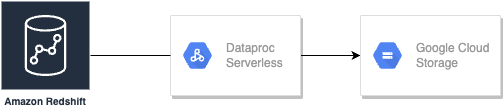
Key Benefits
- Use Dataproc Serverless to run Spark batch workloads without provisioning and managing your own cluster.
- Redshift to GCS template is open source, fully customisable and ready to use for required jobs.
- You can ingest data from Redshift to GCS in Parquet, AVRO, CSV and JSON formats.
Prerequisites
For running these templates, we will need:
- The Google Cloud SDK installed and authenticated
- Python 3.7+ installed
- Connectivity between Redshift in AWS and Dataproc Serverless in GCP.
- AWS Secret Key and Access Key for accessing temp S3 location and Redshift IAM role.
- Require d JARs mentioned here.
Usage
- Create a GCS bucket to use as the staging location for Dataproc. This bucket will be used to store dependencies required to run our serverless cluster.
export STAGING_BUCKET="dataproc-staging-bucket"
gsutil mb gs://$STAGING_BUCKET
2. Clone the Dataproc Templates repository and navigate to the Python. template's directory
git clone https://github.com/GoogleCloudPlatform/dataproc-templates.git
cd dataproc-templates/python
3. Configure the Dataproc Serverless job
To submit the job to Dataproc Serverless, we will use the provided bin/start.sh script. The script requires us to configure the Dataproc Serverless cluster using environment variables.
The mandatory confi guration are:
- GCP_PROJECT : The GCP project to run Dataproc Serverless on.
- REGION : The region to run Dataproc Serverless on.
- GCS_STAGING_LOCATION : A GCS location to where Dataproc will store staging assets. Should be within the bucket we created earlier.
- SUBNET: The Subnet to run Dataproc Serverless in.
# Project ID to run the Dataproc Serverless Job
export GCP_PROJECT=<project_id># GCP region where the job should be submitted
export REGION=<region># The staging location for Dataproc
export GCS_STAGING_LOCATION=gs://$STAGING_BUCKET/staging
export SUBNET=<subnet>
In our case, the Redshift To GCS needs the JARs mentioned in pre-requisites to be available in the classpath. You can store the JAR file on a bucket and we will add it using the JARSenvironment variable.
For exporting Redshi ft data in AVRO file format we also need spark-avro.jar which is already included in bin/start.sh
# Path to the Spark Redshift JAR file
export JARS=<comma-seperated-gcs-bucket-location-containing-jar-file>
4. Execute the Redshift To GCS Dataproc template
After configuring the job, we are ready to trigger it. We will run the bin/start.sh script, specifying the template we want to run and the argument values for the execution.
./bin/start.sh \
-- --template=REDSHIFTTOGCS \
--redshifttogcs.input.url="jdbc:redshift://[Redshift Endpoint]:[PORT]/<dbname>?user=<username>&password=<password>" \
--redshifttogcs.s3.tempdir="s3a://bucket-name/temp" \
--redshifttogcs.input.table="table-name" \
--redshifttogcs.iam.rolearn="arn:aws:iam::xxxxxx:role/Redshift-S3-Role" \
--redshifttogcs.s3.accesskey="xxxxxxxx" \
--redshifttogcs.s3.secretkey="xxxxxxxx" \
--   redshifttogcs.output.location="gs://bucket" \
--redshifttogcs.output.mode=<optional-write-mode> \
--redshifttogcs.output.format=<output-write-format> \
--redshifttogcs.output.partitioncolumn=<optional-output-partition-column-name>
NOTE: Submitting the job will ask you to enable the Dataproc API, if not enabled already.
5. Monitor the Spark batch job
After submitting the job, we will be able to see in the Dataproc Batches UI. From there, we can view both metrics and logs for the job.
References
Exporting data from Redshift to GCS — using GCP Dataproc Serverless and PySpark was originally published in Google Cloud - Community on Medium, where people are continuing the conversation by highlighting and responding to this story.
Comments
Post a Comment