DevOps with serverless Jenkins and AWS Cloud Development Kit (AWS CDK)

The objective of this post is to walk you through how to set up a completely serverless Jenkins environment on AWS Fargate using AWS Cloud Development Kit (AWS CDK). Jenkins is a popular open-source automation server that provides hundreds of plugins to support building, testing, deploying, and automation. Jenkins uses a controller-agent architecture in which […]

The objective of this post is to walk you through how to set up a completely serverless Jenkins environment on AWS Fargate using AWS Cloud Development Kit (AWS CDK).

Jenkins is a popular open-source automation server that provides hundreds of plugins to support building, testing, deploying, and automation. Jenkins uses a controller-agent architecture in which the controller is responsible for serving the web UI, stores the configurations and related data on disk, and delegates the jobs to the worker agents that run these jobs as their primary responsibility.

Amazon Elastic Container Service (Amazon ECS)  using Fargate is a fully-managed container orchestration service that helps you easily deploy, manage, and scale containerized applications. It deeply integrates with the rest of the AWS platform to provide a secure and easy-to-use solution for running container workloads in the cloud and now on your infrastructure. Fargate is a serverless, pay-as-you-go compute engine that lets you focus on building applications without managing servers. Fargate is compatible with both Amazon ECS and Amazon Elastic Kubernetes Service (Amazon EKS).

Solution overview

The following diagram illustrates the solution architecture. The dashed lines indicate the AWS CDK deployment.
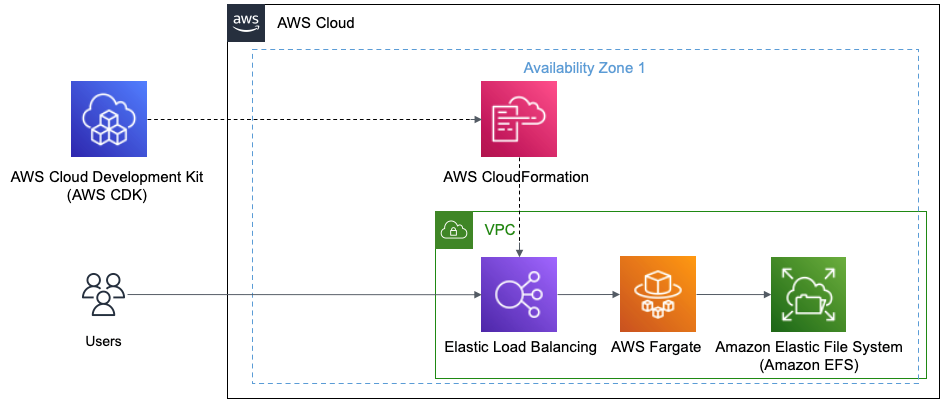
Figure 1 This diagram shows AWS CDK and how it deploys using AWS CloudFormation to create the Elastic Load Balancer, AWS Fargate, and Amazon EFS

Figure 1 This diagram shows AWS CDK and how it deploys using AWS CloudFormation to create the Elastic Load Balancer, AWS Fargate, and Amazon EFS

You’ll be using the following:

  1. The Jenkins controller URL backed by an Application Load Balancer (ALB).
  2. You’ll be using your default Amazon Virtual Private Cloud (Amazon VPC) for this example.
  3. The Jenkins controller runs as a service in Amazon ECS using Fargate as the launch type. You’ll use Amazon Elastic File System (Amazon EFS) as the persistent backing store for the Jenkins controller task. The Jenkins controller and Amazon EFS are launched in private subnets.

Prerequisites

For this post, you’ll utilize AWS CDK using TypeScript.

Follow the guide on Getting Started for AWS CDK to:

  • Get your local environment setup
  • Bootstrap your development account

Code

Let’s review the code used to define the Jenkins environment in AWS using the AWS CDK.

Setup your imports

import { Duration, IResource, RemovalPolicy, Stack, Tags } from 'aws-cdk-lib';  import { Construct } from 'constructs';    import * as cdk from 'aws-cdk-lib';    import * as ecs from 'aws-cdk-lib/aws-ecs';  import * as efs from 'aws-cdk-lib/aws-efs';  import { Port } from 'aws-cdk-lib/aws-ec2';  import * as elbv2 from 'aws-cdk-lib/aws-elasticloadbalancingv2';

Setup your Amazon ECS, which is a logical grouping of tasks or services and set vpc

export class AppStack extends Stack {    constructor(scope: Construct, id: string, props?: cdk.StackProps) {      super(scope, id, props);        const jenkinsHomeDir: string = 'jenkins-home';      const appName: string = 'jenkins-cdk';        const cluster = new ecs.Cluster(this, `${appName}-cluster`, {        clusterName: appName,      });        const vpc = cluster.vpc;

Setup Amazon EFS to store the data

    const fileSystem = new efs.FileSystem(this, `${appName}-efs`, {        vpc: vpc,        fileSystemName: appName,        removalPolicy: RemovalPolicy.DESTROY,      });

Setup Access Point, which are application-specific entry points into an Amazon EFS file system that makes it easier to manage application access to shared datasets

const accessPoint = fileSystem.addAccessPoint(`${appName}-ap`, {        path: `/${jenkinsHomeDir}`,        posixUser: {          uid: '1000',          gid: '1000',        },        createAcl: {          ownerGid: '1000',          ownerUid: '1000',          permissions: '755',        },      });

Setup Task Definition to run Docker containers in Amazon ECS

const taskDefinition = new ecs.FargateTaskDefinition(        this,        `${appName}-task`,        {          family: appName,          cpu: 1024,          memoryLimitMiB: 2048,        }      );

Setup a Volume mapping the Amazon EFS from above to the Task Definition

taskDefinition.addVolume({        name: jenkinsHomeDir,        efsVolumeConfiguration: {          fileSystemId: fileSystem.fileSystemId,          transitEncryption: 'ENABLED',          authorizationConfig: {            accessPointId: accessPoint.accessPointId,            iam: 'ENABLED',          },        },      });

Setup the Container using the Task Definition and the Jenkins image from the registry

const containerDefinition = taskDefinition.addContainer(appName, {        image: ecs.ContainerImage.fromRegistry('jenkins/jenkins:lts'),        logging: ecs.LogDrivers.awsLogs({ streamPrefix: 'jenkins' }),        portMappings: [{ containerPort: 8080 }],      });

Setup Mount Points to bind ephemeral storage to the container

containerDefinition.addMountPoints({        containerPath: '/var/jenkins_home',        sourceVolume: jenkinsHomeDir,        readOnly: false,      });

Setup Fargate Service to run the container serverless

    const fargateService = new ecs.FargateService(this, `${appName}-service`, {        serviceName: appName,        cluster: cluster,        taskDefinition: taskDefinition,        desiredCount: 1,        maxHealthyPercent: 100,        minHealthyPercent: 0,        healthCheckGracePeriod: Duration.minutes(5),      });      fargateService.connections.allowTo(fileSystem, Port.tcp(2049));

Setup ALB and add listener to checks for connection requests, using the protocol and port that you configure.

    const loadBalancer = new elbv2.ApplicationLoadBalancer(        this,        `${appName}-elb`,        {          loadBalancerName: appName,          vpc: vpc,          internetFacing: true,        }      );      const lbListener = loadBalancer.addListener(`${appName}-listener`, {        port: 80,      });

Setup Target to route requests to Jenkins running on Amazon ECS using Fargate

const loadBalancerTarget = lbListener.addTargets(`${appName}-target`, {        port: 8080,        targets: [fargateService],        deregistrationDelay: Duration.seconds(10),        healthCheck: { path: '/login' },      });    }  }

Jenkins Deployment

Now that you have all the code, let’s deploy the AWS CDK definition:

  1. Make sure that you have done the Prerequisite steps from earlier.
  2. Install packages by running the following command in your IDE CLI:
npm i
  1. Now you’ll deploy your AWS CDK definition to your dev account:
cdk deploy

Let’s now login to Jenkins

  1. In your browser, use the DNS Name from the deployed Load Balancer
  2. In Amazon CloudWatch, there will be a Log group that will be created that is associated to Cluster Service.
    1. Go into that log and you’ll see it output the Password to login to Jenkins
  1. In Jenkins, follow the wizard to continue the setup

Cleaning up

To avoid incurring future charges, delete the resources.

Let’s destroy our deploy solution

  1. In your IDE CLI:
cdk destroy

Conclusion

With this overview we were able to cover the following:

  • Build an Elastic Load Balancer
  • Use AWS Fargate with a Jenkins AMI
  • All resources running serverlessly
  • All build using the AWS CDK

About the author:

Josh Thornes

Josh Thornes is a Sr. Technical Account Manager at AWS. He works with AWS Partners at any stage of their software-as-a-service (SaaS) journey in order to help build new products, migrate existing applications, or optimize SaaS solutions on AWS. His areas of interest include builder experience (e.g., developer tools, DevOps culture, CI/CD, Front-end, Mobile, Microservices), security, IoT, analytics.

Namaste Devops is a one stop solution view, read and learn Devops Articles selected from worlds Top Devops content publishers inclusing AWS, Azure and others. All the credit/appreciations/issues apart from the Clean UI and faster loading time goes to original author.

Comments

Did you find the article or blog useful? Please share this among your dev friends or network.

An android app or website on your mind?

We build blazing fast Rest APIs and web-apps and love to discuss and develop on great product ideas over a Google meet call. Let's connect for a free consultation or project development.

Contact Us

Trending DevOps Articles

Working with System.Random and threads safely in .NET Core and .NET Framework

Popular DevOps Categories

Docker aws cdk application load balancer AWS CDK Application security AWS CDK application Application Load Balancers with DevOps Guru Auto scale group Automation Autoscale EC2 Autoscale VPC Autoscaling AWS Azure DevOps Big Data BigQuery CAMS DevOps Containers Data Observability Frequently Asked Devops Questions in Interviews GCP Large Table Export GCP Serverless Dataproc DB Export GTmetrix Page Speed 100% Google Page Speed 100% Healthy CI/CD Pipelines How to use AWS Developer Tools IDL web services Infrastructure as code Istio App Deploy Istio Gateways Istio Installation Istio Official Docs Istio Service Istio Traffic Management Java Database Export with GCP Jenkin K8 Kubernetes Large DB Export GCP Linux MSSQL March announcement MySQL Networking Popular DevOps Tools PostgreSQL Puppet Python Database Export with GCP Python GCP Large Table Export Python GCP Serverless Dataproc DB Export Python Postgres DB Export to BigQuery Sprint Top 100 Devops Questions TypeScript Client Generator anti-patterns of DevOps application performance monitoring (APM) aws amplify deploy blazor webassembly aws cdk application load balancer security group aws cdk construct example aws cdk l2 constructs aws cdk web application firewall aws codeguru reviewer cli command aws devops guru performance management aws service catalog best practices aws service catalog ci/cd aws service catalog examples azure Devops use cases azure devops whitepaper codeguru aws cli deploy asp.net core blazor webassembly devops guru for rds devops guru rds performance devops project explanation devops project ideas devops real time examples devops real time scenarios devops whitepaper aws docker-compose.yml health aware ci/cd pipeline example host and deploy asp.net core blazor webassembly on AWS scalable and secure CI/CD pipelines security vulnerabilities ci cd pipeline security vulnerabilities ci cd pipeline aws smithy code generation smithy server generator
Show more