Top Devops news and How-To articles from Best players in IT industry.
Comprehensive approach to Enterprise Database Migration
Get link
Facebook
X
Pinterest
Email
Other Apps
This blog post is a series of blogs on the database migration approach to be taken care of while you embark the database migration and modernization journey on Google cloud.
Very often we jump into complex database migration with tools which ultimately do not benefit the users and lead to catastrophic failure and many other consequences as well.
At Google cloud we follow a comprehensive approach or framework to de-risk the database migration journey. We start with below 3 approaches
Discovery — Database Migrations are complex, time consuming and challenging. During this Discovery phase intent is to get a clear understanding of customers' key business drivers and their motivation to embark on migration and modernization. Understanding customers's business use case and technical considerations mapping to the use cases. Educating the customers' on Google cloud database portfolio is the key here as well. Ideally a workshop which can span from a few hrs to half a day is recommended.
Scoping & Assessment — Once the discovery workshop is complete then we recommend scoping and assessment for the database footprint in customers' IT landscape. Intent of this exercise is to do analysis preferably with tools to understand the database landscape and migration complexity.
At Google we recommend Startozone to get infrastructure details supporting the database landscape i.e. vCPUs, RAM(memory), storage, OS etc. This is a great start for understanding the customer data estate and often known as "Data Estate Scoping". Scope it out to get a clear picture of the data estate and potential migration targets.
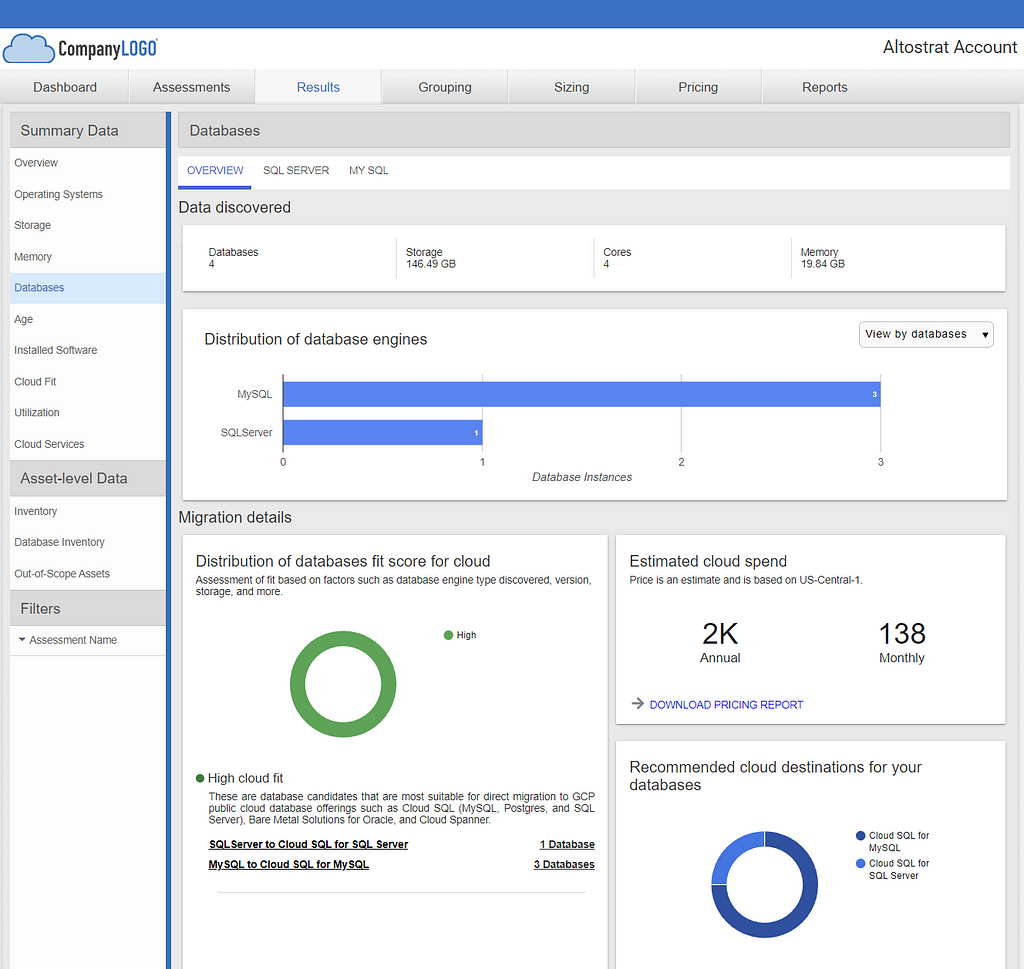
Few screenshots from Startozone tool for database insights f or MySQL database.
Screenshot clearly highlights the database footprint of MySQL — 3 databases and SQL Server — 1 database
Image below clearly highlights various infra details for MySQL databases i.e. cores, memory,storage, OS etc.
Post Scoping database migration assessment is the key which will help to de-risk the migration challenges and provide input to the Migration Planning stage. We recommend using migVisor (Google Cloud Partner Tooling). migVisor is a SaaS platform which basically helps to get started with assessing the database migration complexity to accelerate the DB migration with a cost effect ive approach. Tool in fact can give TCO for target databases on GCP post analyzing the complexity. Currently it supports GCP Cloud SQL and Spanner as target for managed database services.
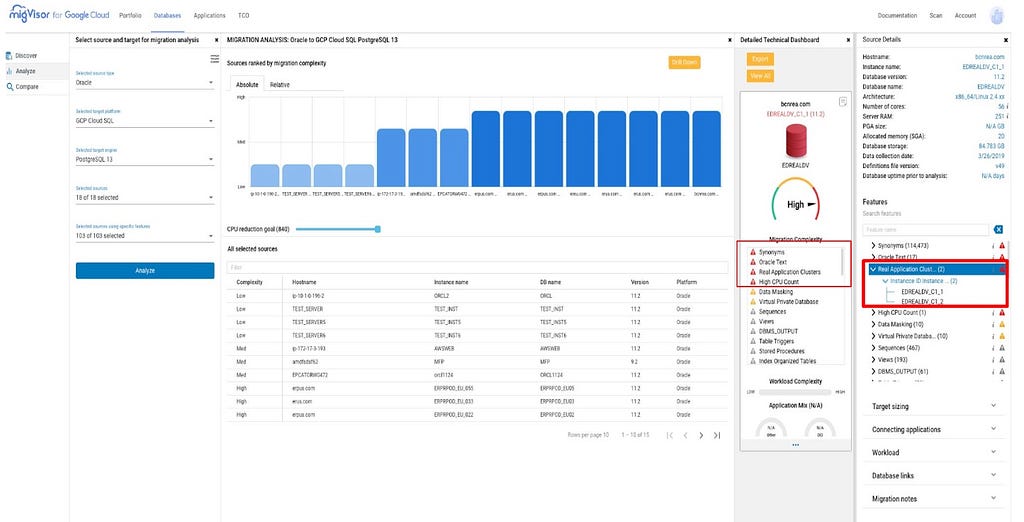
Assuming your source is Oracle database running on Premise or any other Cloud VM you can get recommendation and analysis of complexity involving migration to Postgres DB engine or MySQL engine or SQL Server engine on Cloud SQL. migVisor provides cross-platform collection options, and a web-based console to explore and understand migration complexities. It does one time scan of your source database and highlights source databases configuration, schema, and proprietary database features, application code modernization and current data layer handling.These insights are super critical in analyzing migration complexity. For example Real Application Cluster fondly known as RAC in Oracle world will lead the complexity to high instead of medium or low for migration from Oracle to Postgres or mysql etc as RAC is proprietary to oracle database.
Few Screenshots below once you login into console.migvisor.com. Screenshot from Analyze module — analyzes source database i.e. Oracle with migration analysis for Postgres database engine on Cloud SQL. Red box in the screenshot highlights the use of proprietary feature of Oracle database i.e. Real application cluster with 2 instance ids and this needs to be re-architected on Postgres database engine in Cloud SQL
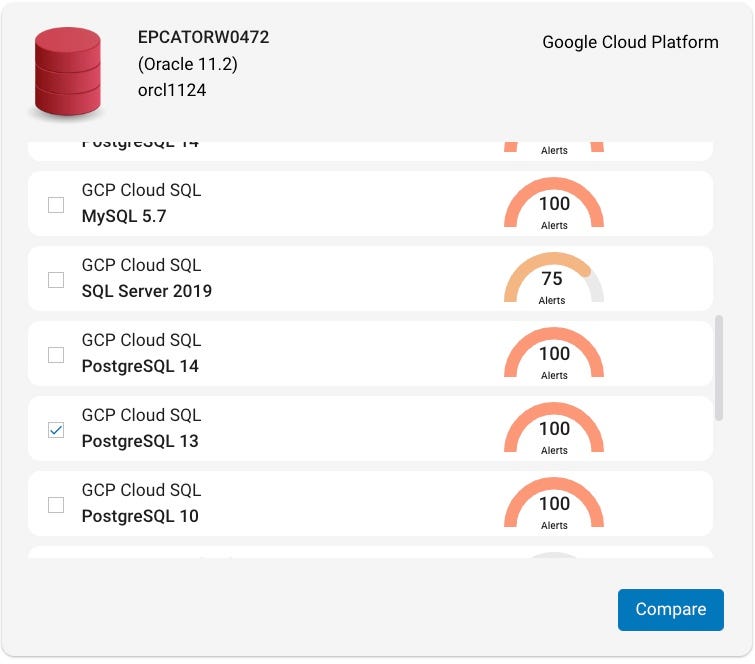
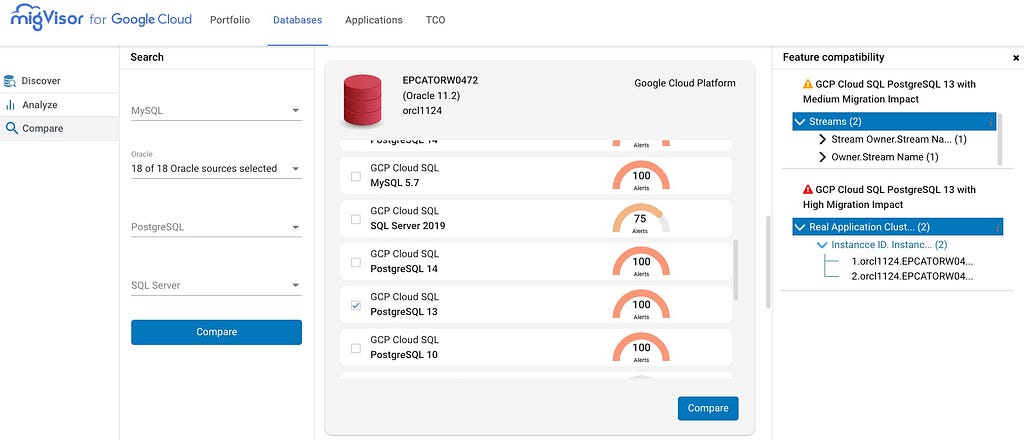
Screenshot from Compare module — Compare dashboard provides a pair-wise study of the complexity to migrate a certain source to a certain target. In my case Postgres 13(Cloud SQL) as a target on Google cloud.
You can keep selecting the required checkboxes i.e. various database engines. Again on the right hand in the image you can see thats has High Migration impact and Medium Migration impact.
Above Insights helps as great inputs to the DB Migration Plan which includes actual migration with tools.
3. Migration — Last but not the least is to incorporate these insights from your previous steps into your migration Plan. This step must have data validation and rollback strategy once migration is completed.
Stay tuned for more details on the migration plan with right tooling on my next blog.
Namaste Devops is a one stop solution view, read and learn Devops Articles selected from worlds Top Devops content publishers inclusing AWS, Azure and others. All the credit/appreciations/issues apart from the Clean UI and faster loading time goes to original author.
Get link
Facebook
X
Pinterest
Email
Other Apps
Comments
Did you find the article or blog useful? Please share this among your dev friends or network.
An android app or website on your mind?
We build blazing fast Rest APIs and web-apps and love to discuss and develop on great product ideas over a Google meet call. Let's connect for a free consultation or project development.
Happy to show you all my latest project in python. ** EC2 Random Name Generato r** This python project is about generating a unique name for the "x" number of EC2 instances for a department and generating random characters and numbers that will be included in the unique name. This is especially important when in an organization, there are so many users, departments sharing an AWS environment. This ensures that they are properly named and are unique so any team member can easily tell to which department he/she belongs to. The ONLY departments that should use this Name Generator are Marketing, Accounting and FinOps. The user then lists these departments as options and if a user puts another department, the program will print a message that they should not use this Name Generator and the program should exi t. Also it checks whether an input has an incorrect upper or lowercase letters for the corresponding department. This program also checks for any negative number input for ...
Trying to reduce your spend seems to be easy, starting by : Shutting down your resources when you don't use it Deleting your unused resources Control who can enable new resources But sometimes it's not enough ! Try to check what are the most used services by looking at your billing export : There is 2 very interesting services in this list : Cloud Run Cloud SQL What can we do for these two ? Committed use discounts (CUDs) for Cloud Run is a 17% discounted pricing in exchange of a continuously use in a particular region for a one year term minimum (up to 3 years max). You commit is in dollars per hour of equivalent on-demand spend. In exchange, you receive a discounted rate on the applicable usage your commitment covers. It's only counting for one specific choosed Google location Any overage is charged at the on-demand rate. You still receive the same discount percentage on applicable usage in the event of a price change. The commitment fee is billed monthly. It's a...
Approach 1-Integrating Gitlab repository with Cloud Build Triggers via webhook | CI/CD pipelines with GKE Hello everyone 👋, In this blog we will build the code from Gitlab repository and deploy our code to Google Kubernetes Engine by integrating it with Cloud Build. Photo by Nicolas Gonzalez on Unsplash As we can see Cloud Build Triggers doesn't give direct option to build our code from Gitlab repository . Only Github, Bitbucket and Google Source Repository are available. So for selecting Gitlab as a source repository , we have 2 approaches. Approach 1 — In order to build our code with Gitlab, we need to introduce Gitlab webhooks to build our code and to automate our builds in response to webhook events. Approach 2 — ( Best Practise ). By creating Mirroring of Repository between Gitlab and Google Cloud Source Repository to use advanced features with our builds that CSR(Cloud Source Repository) provides . In this method we will first mirror the Gitlab repository, then we w...
Hey everyone, I hope you all are doing well. You might have read my previous article on Anthos Service Mesh. In this article, I wanted to give you an overview of Anthos Config Management. For a career in tech, subscribe to The Cloud Pilot Anthos Config Management Overview Anthos Config Management is a configuration and policy management service that enables continuous protection and configuration of Google Cloud. It consists of three components: Policy Controller, Config Sync, and Config Controller Benefits Many benefits come along with Anthos Config Management since it automatically synchronize s configurations and applies policies across multiple clusters. Some of them are: Simplified Management Consistent configurations and policy management Scalability across environments Security and Compliance Components As mentioned earlier, 3 components work together as a single service called Anthos Config Management. They are: Policy Controller Policy Controller enables the enforcement of...
Organizations that embrace multi-cloud services experience real results and a heap of advantages—including greater resiliency, agility and data sovereignty. This is why it's no surprise the majority of enterprises today are using two or more public clouds, with 81% reporting in a recent survey that they plan to adopt a multi-cloud strategy by 2024. But […] The post From Cloud Chaos to Cloud Smart With Multi-Cloud Services appeared first on DevOps.com . Namaste Devops is a one stop solution view, read and learn Devops Articles selected from worlds Top Devops content publishers inclusing AWS, Azure and others. All the credit/appreciations/issues apart from the Clean UI and faster loading time goes to original author .



Comments
Post a Comment