AWS Glue Initial Steps
What is AWS Glue

A serverless data integration service that makes it easy to discover, prepare, and combine data for analytics, machine learning, and application development is called AWS Glue. All the capabilities needed for data integration so that you can start analyzing your data and putting it to use in minutes instead of months are provided by AWS Glue. The process of preparing and combining data for analytics, machine learning, and application development is called Data integration. These tasks are often handled by different types of users that each uses different products. It involves multiple tasks, such as discovering and extracting data from various sources; enriching, cleaning, normalizing, and combining data; and loading and organizing data in databases, data warehouses, and data lakes.
How To Get Glue Up And Running Workflow
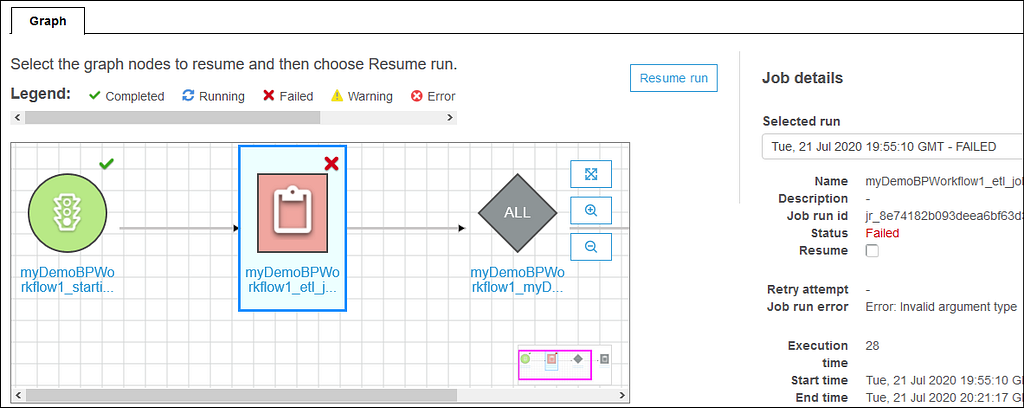
The job becomes quit easy to visually create, run, and monitor AWS Glue ETL jobs using AWS Glue Studio. We can then use the AWS Glue Studio job run dashboard to monitor ETL execution and ensure that your jobs are operating as intended. We can compose ETL jobs that move and transform data using a drag-and-drop editor, and AWS Glue automatically generates the code. More information for AWS Glue is available.
Aws Glue Elastic Views
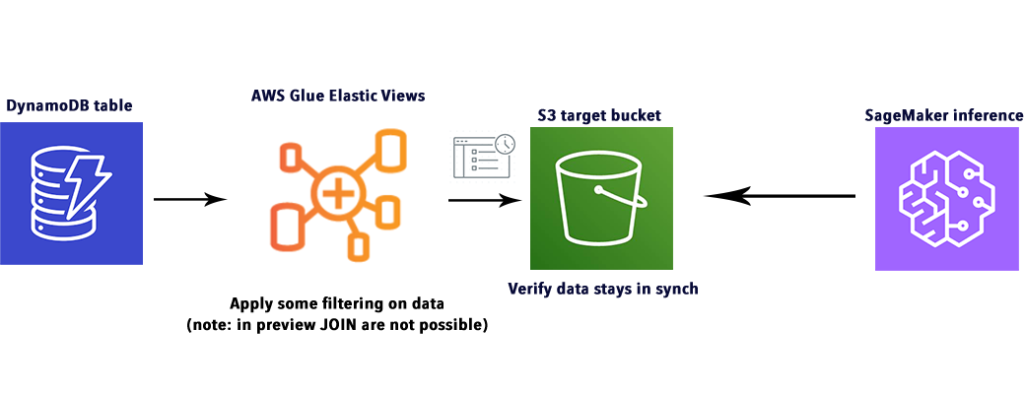
All the materialized views that combine and replicate data across multiple data stores without you having to write custom code is been built using Aws Glue Elastic Views.
All the new applications and features often required here to combine data that resides across multiple data stores, including relational and n on-relational databases are available here. Accessing, combining, replicating, and keeping this data up-to-date requires manual work and custom code that can take months of development time.
We can use familiar Structured Query Language (SQL) to quickly create a virtual table — a materialized view — from multiple different source data stores with AWS Glue Elastic Views. It continuously monitors for changes to data in your source data stores and provides updates to the materialized views in your target data stores automatically, ensuring data accessed through the materialized view is always up-to-date. AWS Glue Elastic Views copies data from each source data store and creates a replica in a target data store.
AWS Glue Elastic Views supports many AWS databases and data stores, including Amazon DynamoDB, Amazon S3, Amazon Redshift, and Amazon OpenSearch Service, with support for Amazon RDS, Amazon Aurora, and others to follow. AWS Glue Elastic Views is serverle ss and scales capacity up or down automatically based on demand, so there's no infrastructure to manage. AWS Glue Elastic Views is available in preview today.
Benefits
- To create a materialized view it uses SQL query
AWS Glue Elastic Views enables you to create materialized views across many databases and data stores using familiar SQL. AWS Glue Elastic Views supports Amazon DynamoDB, Amazon Redshift, Amazon S3, and Amazon OpenSearch Service, with support for more data stores to follow.
2. To target data store it copies data from each source by default.
AWS Glue Elastic Views reduces the time it takes to combine and replicate data across data stores from months to minutes. AWS Glue Elastic Views handles all the heavy lifting of copying and combining data from source to target data stores, without you having to write custom code or use unfamiliar ETL tools and programming languages.
3. It keeps the data in the target data store updated by default
AWS Glue Elastic Views continuously monitors for changes to data in your source data stores, and when changes occur, Elastic Views automatically updates the target data store. This ensures that applications that access data using Elastic Views always have the most up-to-date data.
AWS Glue Data Brew

For Data Analysts and Data Scientists AWS Glue Data Brew is a new visual data preparation tool that makes it easy to clean and normalize data to prepare it for analytics and machine learning. We can automate filtering anomalies, converting data to standard formats, and correcting invalid values, and other tasks. We can choose from over 250 pre-built transformations to automate data preparation tasks, all without the need to write any code. Once the data is ready, you can immediately use it for analytics and machine learn ing projects. Payment is done according to the usage.
Benefits
- The structure is Clean and Normalize
To visualize, clean, and normalize your data with an interactive, point-and-click visual interface we can choose from over 250 built-in transformations
2. Includes Map Data Lineage
It visually map the lineage of your data to understand the various data sources and transformation steps that the data has been through.
3. By default strategies (Automated)
Automate data cleaning and normalization tasks by applying saved transformations directly to new data as it comes into your source system.
Reference https://aws.amazon.com/glue/features/databrew
If you liked this article, please show your appreciation by clapping 👏 below!
Read more on Medium
- Data Catalogue
- Amazon Redshift
- How To Save Money With Aws Redshift Serverless
- Data Cataloging in AWS Glue
- Launching Seekable OCI for container images with Lazy Loading
AWS Glue Initial Steps was originally published in Towards AWS on Medium, where people are continuing the conversation by highlighting and respondin g to this story.
Comments
Post a Comment